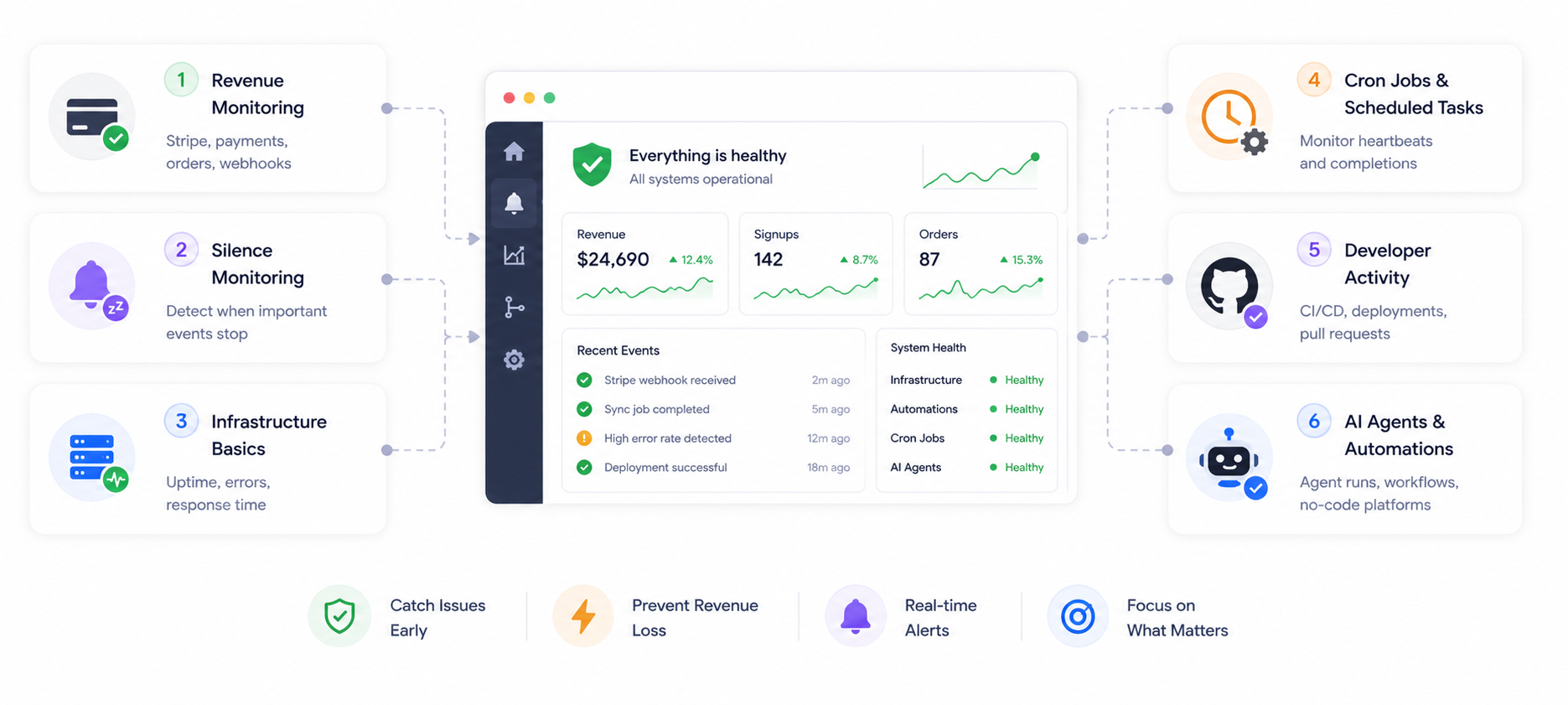
The Founder's Monitoring Stack: What to Watch When You Can't Watch Everything
You're a founder. You don't have an SRE on call at 2am. You have a laptop, a Slack, and the vague anxiety that something is quietly breaking right now. Here's the monitoring stack I wish I'd had from day one.
You're a founder. You're not a DevOps team. You don't have an SRE on call at 2am.
You have a laptop, a Slack, and the vague anxiety that something is quietly breaking right now and you won't find out until a customer emails you about it three days later.
I've been there. Most founders have.
So here's the monitoring stack I wish I'd had from day one — built for the reality of running a small SaaS, not for a 50-person engineering team.
Layer 1 — Revenue Monitoring
If money stops moving, you need to know immediately. Not at end of day. Now.
Stripe webhooks are the silent killer most founders don't monitor. If your webhook endpoint stops receiving events, payment failures go unprocessed, subscription updates don't apply, and refunds queue up silently. Everything looks fine. Revenue logic stops working.
Stripe webhook monitoring catches this. So does monitoring for sudden spikes in payment declines — catch the failure before it compounds into a reconciliation problem.
For Shopify merchants: order monitoring and silent order drop alerts are the equivalent — catch when orders stop flowing before your daily report tells you it was a bad day.
What to set up first:
- Stripe webhook silence alert — alert if no webhook events arrive during business hours
- Payment failure rate spike — alert if failure rate exceeds your baseline
- Shopify order silence — alert if no orders arrive for an abnormally long window
Layer 2 — Silence Monitoring
This is the layer most tools miss entirely. And it's the one that would have caught our 2am signup failure.
Silence monitoring answers a different question from uptime monitoring:
- Uptime monitoring asks: "Is the server on?"
- Silence monitoring asks: "Is anything actually happening?"
Your server can be perfectly healthy while:
- No new users have signed up in 6 hours
- No new orders have come in since midnight
- A background job ran but processed zero records
- An API endpoint is responding but returning empty results
None of these trigger a server alert. All of them are serious business problems.
The concept: if something should happen regularly and it stops — that's an alert. With Smart Silence Detection, no manual threshold is needed. The system learns your historical baseline automatically — including time-of-day and day-of-week patterns — and alerts only when the silence is genuinely abnormal.
What to set up:
- Signup silence alert — alert if no new user registrations for an abnormally long window during business hours
- Order silence alert — alert if no new orders during peak hours
- Custom event silence — any recurring business event that should keep happening
Layer 3 — Infrastructure Basics
Yes, you still need basic server monitoring. But keep it minimal.
What you actually need:
- Server up/down alerts — know before your users tweet about it
- Server silence monitoring — know when your server stops reporting entirely
- API error rate monitoring — a sudden increase in 500s means something changed
What you probably don't need yet: APM dashboards, distributed tracing, custom metrics pipelines. Save that for when you have users actively complaining about performance.
Start simple. A server down alert and an API error rate spike covers 80% of infrastructure failures a small team actually experiences. Add depth as your team and traffic grow.
Layer 4 — Cron Jobs and Scheduled Tasks
Cron jobs are the most undermonitored part of any SaaS stack. Every founder has them. Almost nobody monitors them properly.
The problem isn't when a cron job crashes — that throws an error you can catch. The problem is when it runs successfully but does nothing. Zero records processed. Zero emails sent. Exit code 0. Everything looks fine.
Cron job monitoring works via the SDK task lifecycle — your job sends a start ping when it begins and a completion ping when it finishes, with metrics attached. If the completion ping doesn't arrive, broken flow detection catches it. If the job stops running entirely, Smart Silence Detection catches it.
Three cron jobs worth monitoring immediately:
- Your billing sync job — silent failure means payment state diverges from reality
- Your email delivery job — silent failure means customers stop receiving communications
- Your data cleanup or reporting job — silent failure means storage bloat or stale dashboards
Layer 5 — Developer Activity
If you're shipping code regularly, one signal matters most: did the deploy break something?
GitHub CI/CD monitoring — know immediately when a workflow fails or a deployment breaks. Don't find out because something stopped working in production 20 minutes after a merge.
Keep it to signals that mean something broke or is about to. A failed CI run, a deployment that didn't complete, a PR that's been open for an unusually long time without review. Everything else is noise.
Layer 6 — AI Agents and Automations
If you're running AI agents, n8n workflows, Zapier zaps, or Make scenarios — this layer is increasingly critical and almost entirely unmonitored across the industry.
AI agents fail in ways traditional monitoring misses completely:
Silent no-output — the agent runs, completes, exits successfully, and produces nothing. No exception. No error. Just an empty result that propagates downstream.
Infinite loops — the agent keeps retrying the same tool call in a loop. Token costs climb silently. max_iterations eventually fires. Nobody was watching.
Stuck tool calls — the agent is waiting for a response from an external API that will never come. The process is alive, tokens are being consumed, nothing is progressing. This is what we call a ghost run.
AI agent monitoring catches all three — via the SDK task lifecycle combined with loop detection and Smart Silence Detection.
For no-code platforms, the same principle applies — add start and completion pings to your Zapier, n8n, or Make workflows. A workflow that stopped running three days ago should not be discovered by a customer noticing the downstream effect.
The Setup Order That Matters
Don't try to instrument everything at once. Start with what touches revenue and work outward.
Week 1 — Revenue protection first: Stripe webhook monitoring → payment failure rate spike → Shopify order silence (if applicable)
Week 2 — Business health: Signup silence alert → server up/down → one critical cron job (billing sync)
Week 3 — Operations: API error rate monitoring → GitHub CI/CD failures → second critical cron job (email delivery)
Week 4+ — AI and automation: AI agent task lifecycle monitoring → Zapier/n8n/Make workflow monitoring
Four weeks. Six layers. Comprehensive coverage of the failures that actually cost founders money.
The Honest Truth
You can't watch everything. Nobody on a small team can.
But you can set up systems that watch for you — so your team stays focused on building, not babysitting dashboards.
The goal isn't a wall of monitors someone checks every morning. The goal is confidence — that if something important breaks, or goes quiet, the right person finds out before your users do.
That's the only monitoring that matters at this stage.
The vague anxiety goes away when you know the right things are being watched. Not everything — the right things.
Set up the stack. Then get back to building.
Try NotiLens free for 7 days — no credit card required.
Built for exactly this stack — silence detection, webhook monitoring, cron heartbeats, AI agent oversight, and automation monitoring in one place. We're also giving eligible founders and small teams 3 months free in exchange for honest feedback — reach out directly if that's interesting.