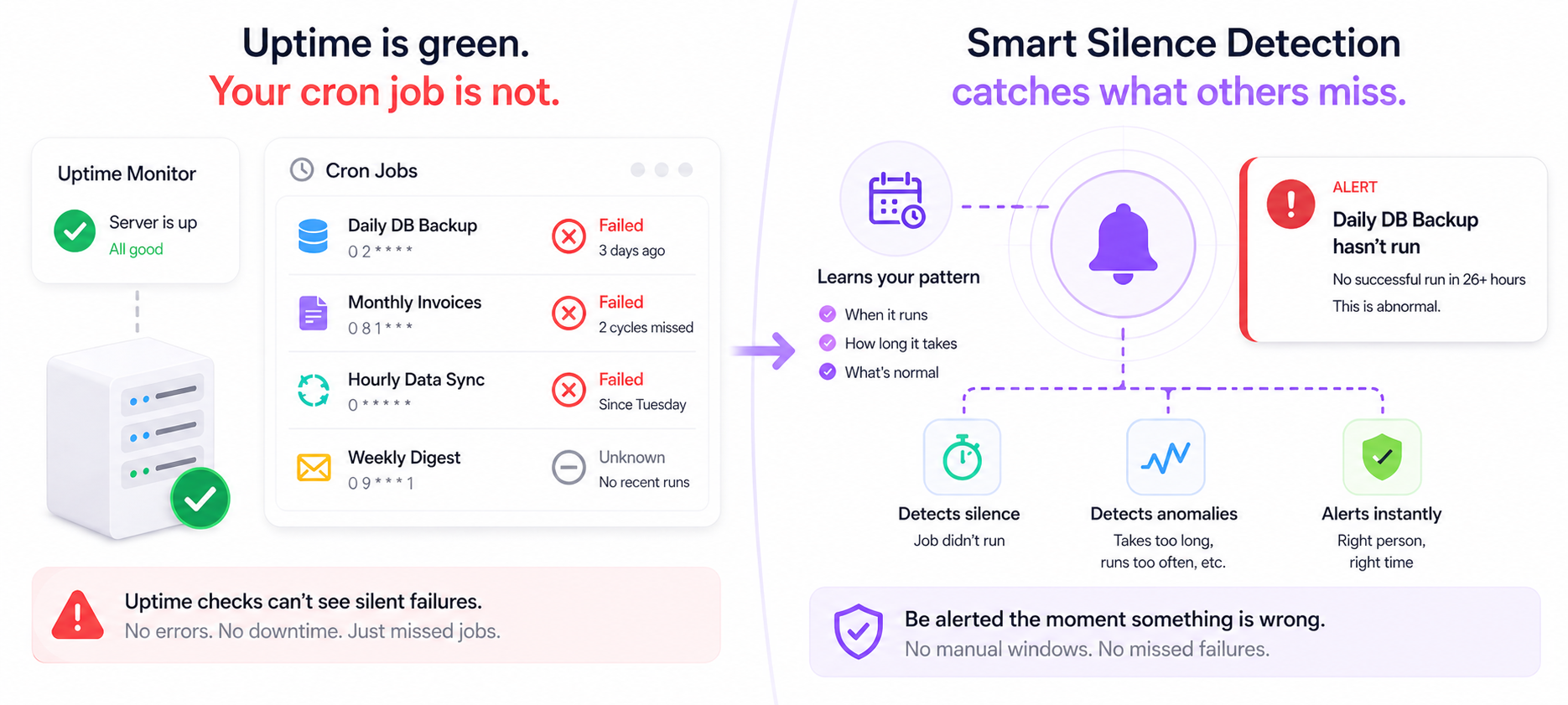
Cron Job Monitoring: Why Uptime Checks Aren't Enough
Your server is up. Your uptime monitor is green. But your cron job silently stopped running 3 days ago — and nobody told you. Here's why uptime checks miss this entirely, and what actually works.
Your server is up. Your uptime monitor is green. Your error logs are clean.
But your daily database backup cron job hasn't run in 3 days. Your weekly invoice generation missed two cycles. Your hourly data sync has been silently failing since Tuesday.
And you have no idea.
This is the cron job monitoring problem — and uptime checks don't solve it.
What Uptime Monitoring Actually Does
Uptime monitoring answers one question: is this URL or server responding?
It sends an HTTP request every few minutes. If it gets a 200 back, everything is fine. If it gets a timeout or a 500, it alerts you.
That's genuinely useful. But it tells you nothing about whether your scheduled jobs are running.
An uptime check on your server will show green even if:
- Your cron daemon crashed and no jobs have run in a week
- A deploy wiped your crontab
- A timezone change caused all jobs to fire at the wrong time and then stop
- A dependency your job relies on (database, S3, external API) became unavailable and the job fails silently on every attempt
- Your job runs but exits with a non-zero code that nobody is watching
- Your job takes 10x longer than expected and is blocking subsequent runs
In every one of these cases: server up, uptime monitor green, business quietly breaking.
Why Cron Jobs Fail Silently
Cron jobs are uniquely prone to silent failure for a few reasons:
No one is watching stdout When a cron job runs on a server, its output goes nowhere unless you've explicitly redirected it. Most teams don't. Errors print into the void.
Exit codes don't trigger alerts by default A cron job can fail with a non-zero exit code every single time and nothing happens — no alert, no email, no log entry visible to anyone who'd notice.
The cron daemon itself can crash
If crond stops running, all your scheduled jobs stop silently. The server is up. The process is dead.
Deploys overwrite crontabs A new deployment can reset your crontab to a previous state, remove entries, or change paths. If nobody audits the crontab after each deploy, jobs disappear without trace.
Timezone and DST changes Server timezone mismatches or daylight saving transitions can shift job timing by an hour — causing jobs to overlap, skip, or run at unexpected times and fail due to resource contention.
Job runtime creep A job that used to take 30 seconds now takes 25 minutes due to data growth. It starts overlapping with the next scheduled run. Both instances fail. Nobody notices because both runs are still being attempted.
The Real Cost of Undetected Cron Failures
Cron jobs tend to handle the things nobody watches in real time — which is exactly why they're so damaging when they fail silently.
Database backups — the cron job that runs nightly to back up your database fails. Three weeks later your database has a catastrophic failure. You restore from backup. The backup is 3 weeks old.
Invoice generation — your monthly billing job fails in silence for two cycles. Customers aren't billed. You notice when MRR looks wrong. Chasing late invoices manually is expensive and awkward.
Data sync jobs — your hourly sync between your app and your data warehouse stops running. Reports and dashboards start showing stale data. Decisions get made on numbers that are days old.
Email digest jobs — your weekly user digest stops sending. Engagement drops. You assume it's a product problem and spend a week investigating.
Cleanup jobs — your nightly log rotation or temp file cleanup job stops. Disk fills up. Something more visible breaks as a consequence — and you spend hours debugging the wrong thing.
In each case, the cron job failure isn't the visible incident. The visible incident comes later, downstream, and is harder to diagnose because the root cause happened days ago.
Why Traditional Monitoring Misses This
Let's go through the common approaches and why they fall short:
Uptime monitors
As covered — they check if your server responds. They have no awareness of whether scheduled jobs ran, completed, or succeeded.
Log monitoring
You can set up log parsing to alert on error strings — but only if your cron job logs errors in a parseable format, to a file that's being monitored, with the right log level. Most cron jobs don't. And log monitoring still can't catch the job that simply didn't run at all — absence of a log entry is invisible.
Email alerts from cron
The classic approach: [email protected] at the top of your crontab. This sends you an email when a job produces output. Problems: it only fires if the job runs and produces output. A job that doesn't run sends no email. A job that runs but produces no output sends no email. And most developers' cron email inboxes become noise within a week.
Healthchecks.io and similar tools
Healthchecks-style tools work by expecting a regular ping from your job — if the ping doesn't arrive within a window, you get alerted. This is much better than uptime monitoring, and it does catch the "job didn't run" failure mode.
But it still requires you to manually define the expected interval for every job. And it still can't detect abnormal patterns — a job that's running but taking 10x longer, or running twice as often as it should, or completing at inconsistent times that suggest an underlying problem.
What Actually Works: Smart Silence Detection
The right model for cron job monitoring is the same as for any business event monitoring: watch for the expected signal, and alert when it doesn't arrive.
NotiLens's Smart Silence Detection takes this further than a simple ping-and-window approach. Instead of requiring you to manually define the expected interval for each job, the ML model learns your job's normal pattern automatically:
- When does this job typically run?
- How long does it usually take?
- What does normal variance look like?
- When is it genuinely abnormal for the job not to have completed?
Once it knows your baseline, it alerts you when something is genuinely wrong — not just when a fixed window expires. This means fewer false positives (no alert just because a job ran 20 minutes late on a Sunday) and faster detection of real failures.
You can also set a manual silence window if you prefer full control — for jobs with strict fixed schedules, a simple "alert if no ping in 26 hours" is often exactly right.
Setting Up Cron Job Monitoring in NotiLens
Step 1 — Create a topic in NotiLens
Go to your NotiLens dashboard → New Topic. Name it after your job — e.g. Daily DB Backup or Hourly Data Sync.
Smart Silence Detection activates automatically. NotiLens starts learning your job's pattern from the first ping.
Step 2 — Instrument your cron job with the SDK
Use the NotiLens SDK to send a start event when the job begins and a complete event when it finishes — with metrics attached. NotiLens uses both signals: if run.start() arrives but run.complete() never does, broken flow detection catches it immediately.
Install:
pip install notilens            # Python
npm install @notilens/notilens  # Node.js
Shell / Bash (CLI):
#!/bin/bash

# Register once: notilens init --name db-backup --token YOUR_TOKEN --secret YOUR_SECRET

notilens start --name db-backup --task backup   # ✦ job started

# Your existing job logic
pg_dump mydb > /backups/mydb-$(date +%Y%m%d).sql
RECORDS_PROCESSED=1

notilens metric records=$RECORDS_PROCESSED --name db-backup --task backup
notilens complete "Backup done" --name db-backup --task backup  # ✦ job completed
Python:
import notilens

nl  = notilens.init(name="db-backup")  # token/secret from env or ~/.notilens_config.json
run = nl.task("backup")

def run_backup():
    run.start()                                  # ✦ job started

    # Your existing job logic
    records_processed = perform_database_backup()

    run.metric("records", records_processed)     # records processed
    run.complete("Backup done")                  # ✦ job completed with metrics

if __name__ == "__main__":
    try:
        run_backup()
    except Exception as e:
        run.fail(str(e))                         # ✦ job failed — alert fires
Node.js:
import { NotiLens } from '@notilens/notilens';

const nl  = NotiLens.init('db-backup'); // token/secret from env or ~/.notilens_config.json
const run = nl.task('backup');

async function runJob() {
  run.start();                                    // ✦ job started

  // Your existing job logic
  const recordsProcessed = await performDatabaseBackup();

  run.metric('records', recordsProcessed);        // records processed
  run.complete('Backup done');                    // ✦ job completed with metrics
}

runJob().catch(err => run.fail(err.message));     // ✦ job failed — alert fires
How NotiLens uses both signals:
run.start()with norun.complete()→ broken flow detected, alert firesrun.complete()with anomalous runtime → Smart Silence Detection flags if job took unusually longrun.metric("records", 0)when normally non-zero → anomaly detected even though job completed- No
run.start()at all → silence alert fires, job didn't run
Step 3 — Configure your alert rules (optional)
Smart Silence Detection handles the baseline automatically. If you want additional rules on top:
- Alert if job hasn't completed in 26 hours (manual fallback for daily jobs)
- Alert if job runtime exceeds 30 minutes (catches jobs that are stuck or running long)
- Alert if job fires more than 3 times in 1 hour (catches accidental duplicate scheduling)
Step 4 — Set notification routing
- Push notification to your phone for immediate awareness
- On-call schedule for nights/weekends if the job is critical
- Escalation policy if the job is business-critical and needs a second pair of eyes
Total setup time: under 5 minutes per job.
Which Cron Jobs to Monitor First
Not all cron jobs carry equal risk. Start with the ones where silent failure is most expensive:
| Job type | Failure cost | Monitor first? |
|---|---|---|
| Database backups | Catastrophic data loss | ✅ Yes — immediately |
| Payment / billing jobs | Revenue loss, customer friction | ✅ Yes — immediately |
| Data sync / ETL | Stale reports, bad decisions | ✅ Yes |
| Email digests / notifications | Engagement drop, churn signal | ✅ Yes |
| Cleanup / rotation jobs | Disk fill, cascading failures | ✅ Yes |
| Report generation | Delayed insights | Medium priority |
| Cache warming | Performance degradation | Lower priority |
| Analytics aggregation | Dashboard staleness | Lower priority |
The rule: if you'd be upset finding out the job hadn't run for 3 days — monitor it now.
Cron job monitoring is Layer 4 of a complete founder stack — see The Founder's Monitoring Stack for the full setup order and priority guide.
Cron Job Monitoring Checklist
Before you consider a cron job properly monitored, it should satisfy all of these:
- Pings NotiLens on successful completion (not just on start)
- Smart Silence Detection enabled — NotiLens learns the normal pattern
- Manual silence window set as fallback for strict-schedule jobs
- Alert fires if job takes longer than expected (stuck job detection)
- Notification routes to the right person at the right time (on-call aware)
- Tested — a deliberately skipped ping confirmed the alert fires correctly
Summary
Uptime monitoring tells you your server is alive. It tells you nothing about whether your scheduled jobs are running, completing, or succeeding.
Cron jobs fail silently by design — no UI, no visible errors, no one watching. The failures compound quietly until something downstream breaks in a way that's expensive to diagnose and fix.
Smart Silence Detection is the right model: send a ping when the job completes, let NotiLens learn what normal looks like, and get alerted the moment something is genuinely wrong. One caught backup failure or missed billing job pays for years of monitoring.
Try NotiLens free for 7 days — no credit card required.
Frequently Asked Questions
What's the difference between NotiLens and Healthchecks.io for cron monitoring? Healthchecks.io uses a fixed-window model — you define the expected interval manually, and it alerts if no ping arrives within that window. NotiLens's Smart Silence Detection learns your job's normal pattern using ML, so it adapts to natural variance without false positives. NotiLens also covers your entire business stack — payments, orders, servers, AI agents — in the same tool, so you're not running a separate monitoring service just for cron jobs.
What if my cron job runs on multiple servers? Create one NotiLens topic per job instance, or use a single topic with server-tagged events. If any instance stops pinging, you'll know which one. Smart Silence Detection handles per-topic baselines independently.
Can I monitor cron jobs that run on a schedule I don't control? Yes. Smart Silence Detection doesn't require you to input a schedule — it infers the pattern from observed pings. If the job runs irregularly, NotiLens learns the irregular baseline and alerts only on genuine gaps.
What if my job fails partway through — will NotiLens catch it? Yes, if you place the ping at the end of the job after all logic completes. A job that crashes or exits early never sends the ping. NotiLens treats the missing ping as a silence event and alerts you. For extra coverage, you can also send a "job started" ping at the beginning and use broken flow detection to catch jobs that start but never complete.
How many cron jobs can I monitor? On the Pro plan, you can create unlimited topics — so unlimited jobs. Each topic gets its own Smart Silence Detection baseline, its own alert rules, and its own notification routing.