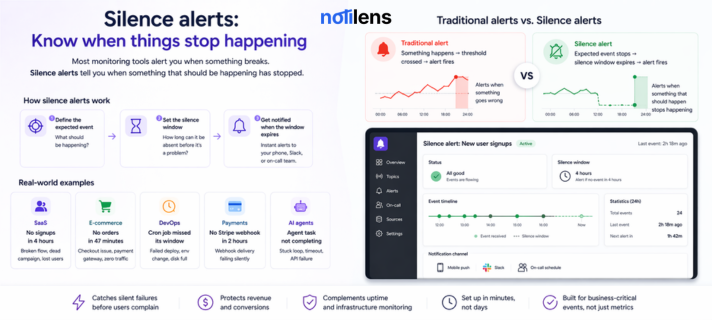
What Is a Silence Alert? The Monitoring Concept Your Stack Is Missing
Most monitoring tools alert you when something breaks. Silence alerts tell you when something that should be happening has stopped — and that's often the more expensive failure.
Your server is up. Your API is responding. Your error rate is normal.
But your signup flow silently broke at 2am — and you won't find out for 6 hours, when a frustrated user emails you.
This is the failure that conventional monitoring misses. And it's often the most expensive one.
It's what silence alerts are built to catch.
The Problem With Conventional Monitoring
Every monitoring tool on the market — Datadog, PagerDuty, UptimeRobot, Grafana — works the same way at its core:
Something happens → a threshold is crossed → an alert fires.
CPU goes above 90%? Alert. API starts returning 500 errors? Alert. Server goes offline? Alert.
This model is reactive. It waits for something to go wrong, then tells you.
But some of the most costly failures in a business aren't things going wrong. They're things stopping.
- Your payment processor starts silently dropping webhooks
- Your cron job misses its 3am window because of a deploy
- Your signup form breaks on mobile — no errors, just no new users
- Your AI agent gets stuck and stops completing tasks
- Your Shopify store stops receiving orders during peak hours
In every one of these cases, conventional monitors see nothing — because technically, nothing is broken. No errors. No threshold crossed. Everything looks fine.
But your business is bleeding.
What Is a Silence Alert?
A silence alert (also called a no-event alert or missing activity alert) fires when an expected event stops occurring within a defined time window.
Instead of asking "did something bad happen?", a silence alert asks:
"Did the thing that should be happening — happen?"
If the answer is no — you get alerted.
It's a fundamentally different monitoring model. You're not watching for failures. You're watching for the absence of success.
How Silence Alerts Work
Setting up a silence alert has three parts:
1. Define the expected event What should be happening? A new user signup. A Stripe payment. A cron job completing. An AI agent sending a result. An order coming in on Shopify.
2. Set the silence window How long can this event be absent before it's a problem? 30 minutes? 2 hours? 24 hours? This depends on your baseline — a busy e-commerce store might alert after 20 minutes of no orders during peak hours. A weekly report job might alert after 26 hours.
3. Get notified when the window expires If no event arrives within the silence window, the alert fires — to your phone, your team's Slack, your on-call engineer — wherever you've configured it.
When the event starts flowing again, NotiLens automatically resolves the alert.
Real-World Examples
SaaS — Signup flow monitor
Event: New user signup
Silence window: 4 hours (during business hours)
Why it matters: If no new user signs up for 4 hours on a weekday, something is wrong — the form is broken, the landing page is down, or a marketing campaign link is dead. You'd never catch this with an uptime monitor.
E-commerce — Order dead zone
Event: New Shopify order
Silence window: 47 minutes (during peak trading hours)
Why it matters: No orders for 47 minutes during a Saturday afternoon is statistically impossible for a healthy store. Something is broken — checkout flow, payment gateway, or a campaign driving zero traffic.
DevOps — Cron job watchdog
Event: Cron job completion ping
Silence window: 26 hours (for a daily job)
Why it matters: Cron jobs fail silently all the time — a missed deploy, a changed environment variable, a disk space issue. Without a silence alert, you find out when data is missing or a report hasn't arrived.
Payments — Stripe webhook gap
Event: Stripe payment webhook received
Silence window: 2 hours (during business hours)
Why it matters: Stripe webhook delivery can fail silently. If payments stop flowing and your system never receives the webhooks, your database thinks nothing is happening — even while customers are charged.
AI agents — Task completion monitor
Event: Agent task completion event
Silence window: 2 hours
Why it matters: LLM-powered agents can get stuck in loops, hit token limits, or stall waiting for external APIs. A silence alert catches this before the agent burns hours of compute or misses a user-facing deadline.
Silence Alerts vs Uptime Monitoring
People often confuse the two. They're solving different problems.
| Uptime Monitor | Silence Alert | |
|---|---|---|
| What it watches | Is the server/URL responding? | Is the expected business event occurring? |
| What it catches | Server down, HTTP errors, SSL expiry | Silent failures, broken flows, missed jobs |
| Example alert | "Your site returned a 503" | "No new signups in 4 hours" |
| False negative risk | Low — servers are either up or down | Zero — you define what "healthy" looks like |
| Business relevance | Infrastructure health | Revenue and operational health |
You need both. An uptime monitor catches the server going down. A silence alert catches the signup form that's broken even though the server is up.
Silence Alerts vs Anomaly Detection
Anomaly detection (used by tools like Datadog) watches for statistical deviations in a metric — if your order volume drops 3 standard deviations below baseline, it fires.
Silence alerts are simpler and more direct:
| Anomaly Detection | Silence Alert (NotiLens) | |
|---|---|---|
| How it works | ML model on historical data | Smart Silence Detection (ML) or manual window |
| Requires history | Yes — needs baseline data | No — Smart mode learns as it goes |
| Configuration | Complex, per-metric tuning | Enable Smart Silence Detection, done |
| Best for | Gradual trend changes | Hard stops and missing events |
| False positive rate | Can be high early on | Low — ML adapts to your real patterns |
Anomaly detection is powerful but noisy, especially on new metrics. Silence alerts are blunt and reliable — perfect for business-critical flows where you know exactly what "healthy" looks like.
Why Most Monitoring Tools Don't Have This
It's a surprisingly common question. Silence alerts seem obvious in hindsight — so why don't Datadog, PagerDuty, or Grafana support them natively?
The answer is history. These tools were built around infrastructure telemetry — metrics that are always flowing (CPU, memory, request rate). Their alert models assume constant data streams and look for threshold crossings.
Silence alerts require a different mental model: you're monitoring for the absence of something, not the presence of a bad value. That means tracking expected events, not observed metrics. It means understanding your business flows, not just your infrastructure.
Most infra tools have never needed to understand what your business should be doing. NotiLens was built from the start around this concept.
How to Set Up Your First Silence Alert
Setting up a silence alert in NotiLens takes under 2 minutes:
- Connect your source — Stripe, Shopify, GitHub, or your own app via webhook or SDK
- Create a topic — give it a name like "Daily signups" or "Shopify orders"
- Enable Smart Silence Detection — NotiLens automatically learns your normal activity pattern and alerts you when things go abnormally quiet. No window to configure, no baseline data needed upfront. Prefer full control? You can still set a manual window instead.
- Choose your notification channel — push, email, Slack, on-call schedule
- Done — NotiLens watches your activity pattern and alerts you the moment something goes unusually silent
No YAML. No query language. No agent to install.
What to Monitor With Silence Alerts First
If you're not sure where to start, here are the five silence alerts that catch the most costly failures for small teams:
- Signup or lead form submissions — catches broken onboarding flows immediately
- Payment or order events — catches revenue-stopping failures before users complain
- Daily cron jobs — catches scheduled task failures that corrupt data silently
- Stripe or payment webhook delivery — catches webhook gaps before reconciliation breaks
- AI agent task completions — catches stuck or looping agents before they waste compute
Set these five up and you've covered the silent failures that cost most small businesses the most money.
For the recommended order to set all of this up across your full stack, see The Founder's Monitoring Stack.
Summary
Silence alerts are the monitoring concept that fills the gap between "everything looks fine" and "something is quietly broken."
They don't replace uptime monitors or infrastructure observability. They complete the picture — watching the business layer that infrastructure tools have always ignored.
If your stack processes payments, handles signups, runs scheduled jobs, or powers AI agents — silence alerts aren't optional. They're the difference between finding out from your monitoring and finding out from your users.
Try silence alerts free for 7 days — no credit card required.
Frequently Asked Questions
Are silence alerts the same as dead man's switch monitoring? Very similar concept. A dead man's switch fires if it doesn't receive a regular "I'm alive" ping. Silence alerts are the business-layer equivalent — they fire when an expected business event (signup, payment, cron job) stops arriving within a defined window. NotiLens supports both patterns.
Do I need to write code to use silence alerts? No. For Stripe, Shopify, and GitHub, NotiLens connects with one click and detects event gaps automatically. For custom apps, you send a simple HTTP ping to NotiLens when the event occurs — and NotiLens alerts you if the pings stop. The SDK makes this a single line of code.
How do I set the right silence window? You don't have to. NotiLens's Smart Silence Detection uses ML to automatically learn your normal activity patterns and alerts you when things go abnormally quiet — no manual window needed. If you prefer to define your own threshold, you can still set a manual window. Most teams start with Smart Silence Detection and switch to manual only for jobs with a very strict fixed schedule (like a cron job that must run exactly every hour).
Can silence alerts cause false positives? With Smart Silence Detection, false positives are very low — the ML model learns your actual traffic patterns including nights, weekends, and seasonal dips, so it doesn't alert just because Sunday is quiet. Manual windows can occasionally fire during planned low-traffic periods, but NotiLens lets you snooze or override alerts for scheduled windows.
What's the difference between a silence alert and a heartbeat monitor? A heartbeat monitor expects a regular ping at a fixed interval (every 5 minutes, every hour). A silence alert is more flexible — it expects at least one event within a rolling window, regardless of exact timing. Heartbeats are for jobs with fixed schedules. Silence alerts are for flows with variable rates (signups, orders, agent completions).