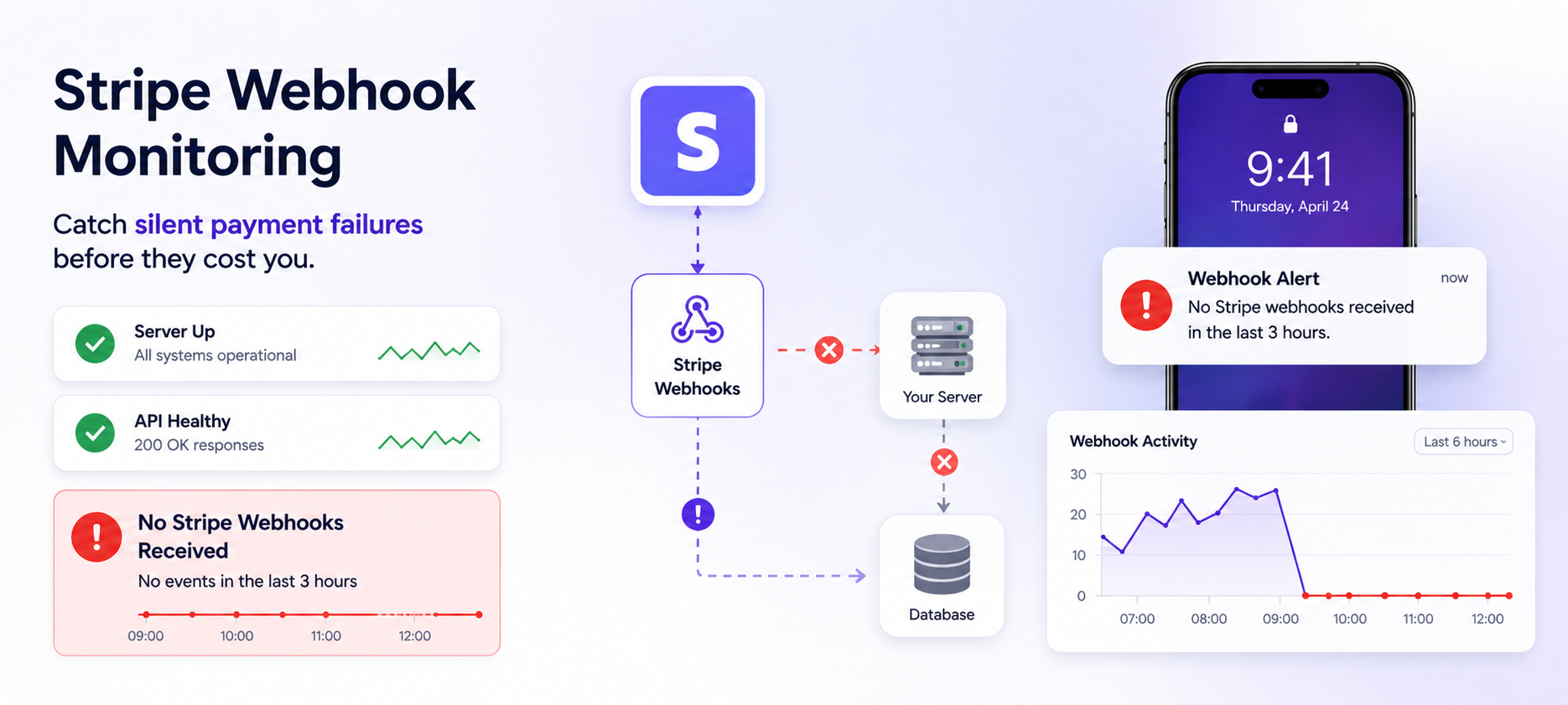
Stripe Webhook Monitoring: The Silent Failure No One Talks About
Stripe webhooks fail silently. Your server looks fine, your API is up, but payments are being processed with no record in your database. Here's how to catch it before it costs you.
Your Stripe dashboard shows payments coming in. Your server is up. Your API is returning 200s.
But your database hasn't recorded a single payment in the last 3 hours.
This is the Stripe webhook failure that nobody warns you about — and it's more common than you think.
What Are Stripe Webhooks and Why Do They Matter?
When a payment is completed, a subscription renews, or a refund is issued, Stripe doesn't just update its own records. It sends an HTTP POST request — a webhook — to a URL on your server. Your application listens for that webhook and uses it to:
- Update your database with the payment record
- Provision access to a paid feature
- Trigger a receipt email
- Sync with your accounting system
- Update subscription status in your app
Webhooks are the backbone of your payment logic. If they stop arriving — or stop being processed — your entire payment pipeline breaks silently while Stripe continues charging customers.
How Stripe Webhook Failures Happen
Stripe webhook delivery can fail for more reasons than most developers realise:
Your server returns a non-2xx response Stripe retries failed webhooks, but only for a limited time. If your endpoint keeps returning 500s — due to a bug, a database connection failure, or a misconfigured environment variable — Stripe eventually stops retrying. Events are lost.
Your endpoint URL changes A deployment changes a route. A reverse proxy config gets updated. The webhook URL in your Stripe dashboard now points to a 404. Stripe sends events to the void.
SSL certificate expires Stripe validates SSL on webhook endpoints. An expired cert causes Stripe to reject the connection silently — from your server's perspective, nothing happened.
Webhook signing secret rotates You rotate your Stripe webhook secret but forget to update the environment variable on one server. That server rejects every incoming webhook as invalid — but returns a 400 quietly, with no alert.
Database connection drops during processing The webhook arrives and is acknowledged with a 200 (so Stripe stops retrying), but the database write fails. The payment is processed, Stripe has the record, but your system doesn't.
High traffic overwhelms your endpoint A flash sale or viral moment sends a spike of Stripe events. Your webhook handler becomes a bottleneck. Events queue up, timeout, and Stripe marks them as failed.
In every one of these scenarios, your monitoring shows green. No server errors. No downtime. Just a growing gap between what Stripe knows and what your database knows.
Why This Is Hard to Catch
The fundamental problem is that Stripe webhook failures are silent from your server's perspective.
Your uptime monitor checks if your server responds. It does. ✅
Your error rate monitor checks if your API is throwing 500s. It isn't. ✅
Your Stripe dashboard shows payments succeeding. They are. ✅
Nothing in your conventional monitoring stack sees the gap. The only way to catch it is to monitor what should be happening — webhook events arriving and being processed — and alert when they stop.
This is exactly what silence alerts are built for.
The Real Cost of Undetected Webhook Failures
Let's make this concrete. Here's what actually happens when Stripe webhooks silently fail for 3 hours on a SaaS with 500 customers:
- Subscription renewals processed but access not provisioned → customers locked out of a service they paid for
- New signups charged but accounts not activated → support tickets flood in
- Refunds issued but not reflected in your database → double-processing risk on reconciliation
- Churn events missed → you think the customer is still active, stop sending win-back emails
The financial reconciliation alone can take days to untangle. The customer trust damage is harder to measure.
A 3-hour gap found immediately costs you an hour of engineering time. A 3-hour gap found 2 days later costs you much more.
How to Monitor Stripe Webhooks With NotiLens
NotiLens monitors Stripe webhook delivery in two ways:
1 — Smart Silence Detection + Broken Flow Detection (Recommended)
Connect NotiLens to your Stripe account. NotiLens watches the flow of incoming webhook events and uses Smart Silence Detection to learn your normal pattern automatically — how frequently payments, subscription renewals, and other events typically arrive.
When webhook activity goes abnormally quiet — no events for longer than your baseline — NotiLens alerts you immediately. No manual threshold to set. No baseline data required upfront. The ML model learns as it goes.
NotiLens also detects broken multi-step flows. If a payment.initiated event never reaches payment.completed within the expected window, you'll know — before your customer does. This catches partial failures that silence detection alone would miss: the payment started, something broke in the middle, and it never finished.
2 — Manual Silence Window
Prefer full control? You can configure a manual silence window instead:
- Create a NotiLens topic — name it "Stripe webhooks" or "Payment events"
- Send a ping to NotiLens each time your webhook handler successfully processes an event (one line in your webhook handler)
- Set a silence window — e.g. "alert if no event in 24 hours"
- Get alerted the moment the window expires without a successful processing event This catches both upstream failures (Stripe not delivering) and downstream failures (your handler receiving but not processing correctly).
Setting Up Stripe Monitoring (10 Minutes)
Step 1 — Set Up Your Stripe Webhook in NotiLens
1. Create a Stripe Webhook in the NotiLens app
Open the NotiLens app and select the Stripe integration. Update the topic and description if needed (optional). Copy the generated webhook URL — it looks like this:
https://hook.notilens.com/webhook/<topic_id>/send
2. Add the webhook in your Stripe Dashboard
Go to Stripe Dashboard → Developers → Webhooks and click Add destination. Click Select events and choose the events that match what you want to track:
| What you want to track | Event to select |
|---|---|
| Payment success | payment_intent.succeeded |
| Payment failed | payment_intent.payment_failed |
| Refund issued | charge.refunded |
| New subscription started | customer.subscription.created |
| Subscription payment failed | invoice.payment_failed |
| Subscription cancelled | customer.subscription.deleted |
| Customer location & billing address | payment_intent.succeeded |
| Charge amount & currency detail | charge.succeeded |
You can select multiple events in one destination — select all the ones you need at once. Click Continue, select Webhook endpoint as the destination type, paste your NotiLens webhook URL into the Endpoint URL field, and click Create destination.
If you're in test mode, click Send test event on the endpoint page to verify — the event will appear in the NotiLens app.
3. Copy and configure the signing secret
On the endpoint page in Stripe, click Reveal next to Signing secret and copy the value (starts with whsec_). Open the webhook settings in the NotiLens app, click Edit Secret Key, paste the signing secret, and click Update Secret.
Done. Send another test event from Stripe to confirm everything is working correctly.
Smart Silence Detection and broken flow detection activate automatically once events start flowing. No additional code required for this layer.
Step 2 — Optionally confirm processing from your own handler
If you also want to confirm that your application layer processed the webhook correctly (not just that Stripe delivered it), use the NotiLens SDK inside your handler:
Install:
pip install notilens        # Python
npm install @notilens/notilens  # Node.js
Python:
import notilens

nl  = notilens.init(name="stripe-webhooks")  # token/secret from env or ~/.notilens_config.json
run = nl.task("payment")

@app.route('/webhooks/stripe', methods=['POST'])
def stripe_webhook():
    payload = request.data
    sig_header = request.headers.get('Stripe-Signature')

    try:
        event = stripe.Webhook.construct_event(
            payload, sig_header, os.environ['STRIPE_WEBHOOK_SECRET']
        )
    except ValueError:
        return '', 400

    if event['type'] == 'payment_intent.succeeded':
        run.start()                                    # ✦ flow started
        handle_payment_success(event['data']['object'])
        run.metric("amount", event['data']['object']['amount'])
        run.complete("Payment processed successfully") # ✦ flow completed

    return '', 200
Node.js:
import { NotiLens } from '@notilens/notilens';

const nl  = NotiLens.init('stripe-webhooks'); // token/secret from env or ~/.notilens_config.json
const run = nl.task('payment');

app.post('/webhooks/stripe', express.raw({ type: 'application/json' }), async (req, res) => {
  const sig = req.headers['stripe-signature'];

  let event;
  try {
    event = stripe.webhooks.constructEvent(req.body, sig, process.env.STRIPE_WEBHOOK_SECRET);
  } catch (err) {
    return res.status(400).send(`Webhook Error: ${err.message}`);
  }

  if (event.type === 'payment_intent.succeeded') {
    run.start();                                         // ✦ flow started
    await handlePaymentSuccess(event.data.object);
    run.metric('amount', event.data.object.amount);
    run.complete('Payment processed successfully');      // ✦ flow completed
  }

  res.json({ received: true });
});
If run.start() fires but run.complete() never arrives — whether because Stripe stopped delivering, your handler crashed, or the flow broke midway — NotiLens catches it and alerts you immediately.
What to Alert On Beyond Delivery
Webhook delivery is just one layer. Here's a complete Stripe monitoring setup for a SaaS:
| Alert | What it catches |
|---|---|
| No webhook events in X hours | Stripe delivery failure, endpoint URL change, SSL expiry |
| No successful payment in 2 hours (business hours) | Payment processing failure, Stripe outage |
| Sudden spike in refund events | Fraud, billing error, product issue |
| Subscription cancellation spike | Churn event, billing issue, product problem |
| No new subscription created in 4 hours | Broken checkout flow, pricing page issue |
| Failed payment rate > threshold | Card decline spike, checkout UX problem |
NotiLens can monitor all of these from a single Stripe connection — both silence-based (no events in X time) and threshold-based (refund rate > N%).
Stripe's Built-In Retry Logic — And Why It's Not Enough
Stripe does retry failed webhooks — up to 8 times over 3 days, with exponential backoff. This sounds reassuring. It isn't, for two reasons:
1. You won't know it's retrying Stripe retries silently. Unless you're actively watching your Stripe webhook dashboard, you have no idea events are being retried — or that your endpoint has been failing for hours.
2. Retries don't help if your handler is broken If your handler receives the webhook and returns a 200 (so Stripe stops retrying) but fails internally — the event is gone. Stripe thinks it was delivered. Your system never processed it.
Monitoring at the Stripe level (did it deliver?) is necessary but not sufficient. You need to monitor at the application level (did my handler process it correctly?). The NotiLens ping approach covers both.
Setting Up a Stripe Webhook Alert in NotiLens
- Go to your NotiLens dashboard → New Topic
- Name it:
Stripe - Payment Webhooks - Smart Silence Detection enabled automatically — NotiLens learns your payment frequency and alerts when activity goes abnormally quiet
- Optionally add manual smart rules for specific conditions, for example:
- Alert if
charge.refundedevents exceed 5 in 10 minutes (refund spike) - Alert if
invoice.payment_failedevents exceed 3 in 1 hour (subscription billing issue) - Alert if no
payment_intent.succeededevent in 24 hours (manual silence fallback)
- Alert if
- Add the ping to your webhook handler (2 lines of code — see above)
- Set on-call schedule for nights/weekends & escalation policies if needed.
- Done
Total setup time: under 10 minutes.
Stripe webhook monitoring is Layer 1 of a complete founder stack — see The Founder's Monitoring Stack for the full setup order.
Summary
Stripe webhooks are the silent backbone of your payment infrastructure. When they fail, everything breaks — but nothing in your conventional monitoring stack tells you.
Smart silence detection is the only monitoring approach that catches this class of failure. By watching for the absence of expected payment events — not just the presence of errors — you catch webhook gaps before they compound into reconciliation nightmares and customer trust damage.
One caught webhook failure pays for years of NotiLens.
Try NotiLens free for 7 days — no credit card required.
Frequently Asked Questions
Does NotiLens integrate directly with Stripe? Yes. NotiLens connects to Stripe with one click and can monitor payment events, subscription changes, refunds, and more natively. For processing-level monitoring (did my handler actually process it?), add a one-line ping to your webhook handler as shown above.
What's the difference between monitoring Stripe delivery and monitoring webhook processing? Stripe delivery monitoring checks whether Stripe successfully sent the event to your endpoint. Processing monitoring checks whether your handler correctly processed it and wrote to your database. Both can fail independently. NotiLens covers both — native Stripe integration for delivery, ping-based monitoring for processing.
Will NotiLens alert me during low-traffic periods like nights or weekends? With Smart Silence Detection, no — the ML model learns that your payment volume is naturally lower overnight and doesn't alert on expected quiet periods.
Can I monitor multiple Stripe accounts? Yes. Create a separate NotiLens topic per Stripe account and add the appropriate pings in each environment's webhook handler.
What if I use Stripe with a payment orchestration layer like Paddle or Chargebee? The same approach works. Add the NotiLens ping wherever your payment events are processed — whether that's a raw Stripe webhook, a Paddle webhook, or a unified billing event from your orchestration layer. NotiLens is source-agnostic.