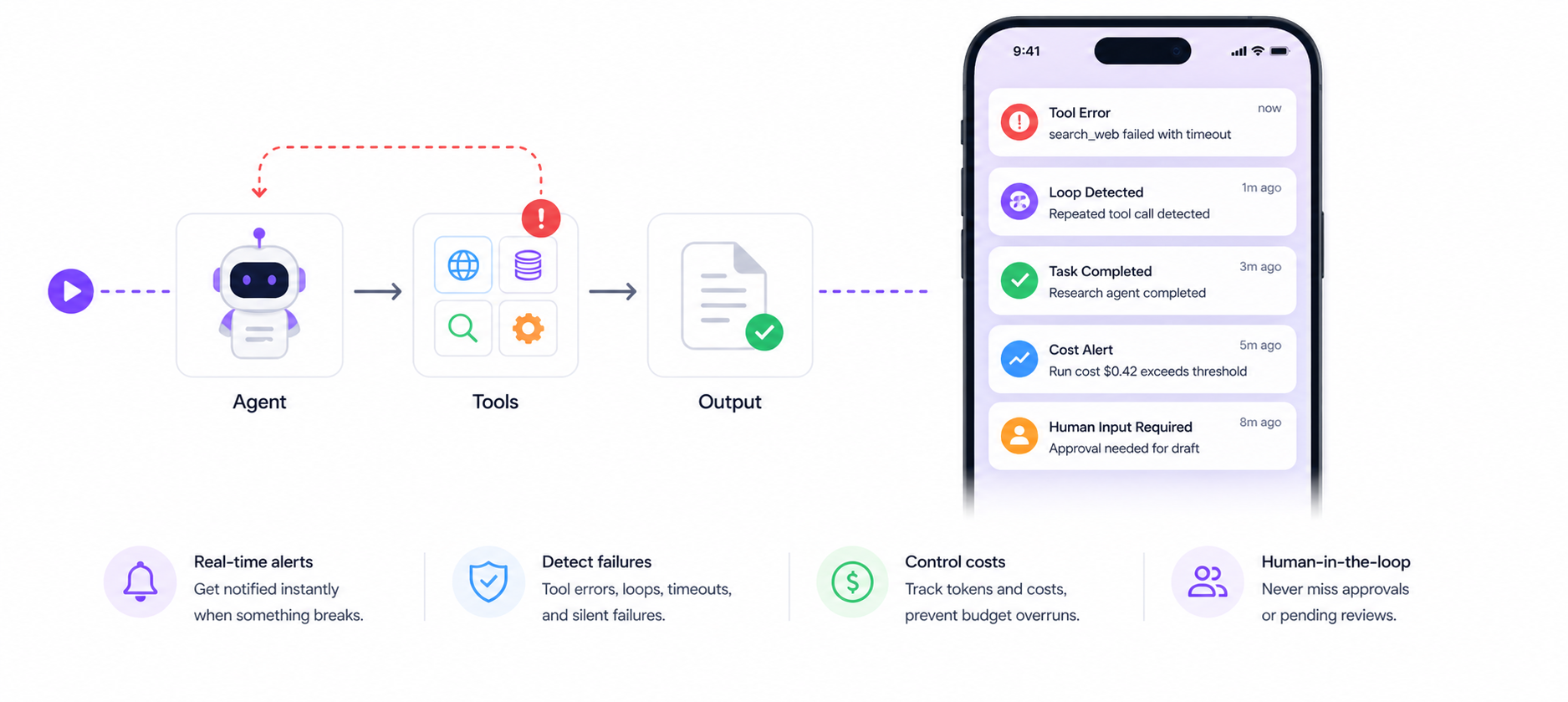
How to Monitor LangChain Agents in Production
LangChain agents fail silently in production — tool errors, infinite loops, stalled chains, cost spikes. Here's how to add real-time monitoring and alerts to any LangChain agent in under 10 minutes.
LangChain makes it easy to build agents. It doesn't make it easy to know when they break.
In development, you watch the terminal. In production, your agent runs unattended — and when it fails, loops, or quietly burns through your API budget, nobody tells you.
This guide covers every failure mode LangChain agents hit in production and how to instrument them with real-time alerts using NotiLens.
What Goes Wrong With LangChain Agents in Production
Before we instrument anything, it's worth knowing what you're monitoring for.
Tool call failures LangChain agents call external tools — APIs, databases, file systems, search engines. Any of these can fail. When they do, LangChain may retry silently, fall back to a wrong path, or stall the entire chain. Without monitoring, you find out when the agent's output is wrong or missing.
Infinite loops
An agent that can't make progress will keep retrying — the same tool call, the same failed step — until it hits a token limit or you run out of money. LangChain has max_iterations as a safeguard, but it doesn't alert you when it triggers.
Token budget overruns A complex chain can consume far more tokens than expected — especially with recursive tool use, large context windows, or malformed prompts that produce unusually long completions. Without cost monitoring, you discover this on your OpenAI invoice.
Stalled chains An agent waiting for a slow external API can hang indefinitely. LangChain doesn't have built-in timeout alerting. A stalled agent holds a thread, burns context window, and produces no output — silently.
Silent wrong outputs The agent completes. It returns an answer. The answer is wrong. Without output validation monitoring, this reaches your users.
Human-in-the-loop gaps If your agent is designed to pause for human approval, and the approval mechanism breaks — the agent either proceeds without approval or stalls forever. Neither is visible without monitoring.
The Monitoring Stack You Need
For production LangChain agents you need visibility across four layers:
| Layer | What to watch | NotiLens method |
|---|---|---|
| Task lifecycle | Did the agent start, progress, complete, or fail? | run.start(), run.complete(), run.fail() |
| Tool calls | Which tools fired, did they succeed, how long did they take? | run.progress(), run.error(), run.track() |
| Metrics | Token usage, cost, iteration count, latency | run.metric() |
| Human-in-the-loop | Does the agent need a human decision? | run.input_required() |
NotiLens covers all four with a single SDK.
Installation
pip install notilens langchain langchain-openai
Initialise NotiLens once at app startup:
import notilens

nl = notilens.init(
    name="langchain-agent",
    token="YOUR_TOKEN",    # or set NOTILENS_TOKEN env var
    secret="YOUR_SECRET"   # or set NOTILENS_SECRET env var
)
After first run, credentials are saved to ~/.notilens_config.json — no need to pass them again.
Option 1 — Auto-Patch (Zero Code Changes)
The fastest way to get monitoring. Enable patch=True and NotiLens automatically instruments every OpenAI and Anthropic call your LangChain agent makes — no changes to your agent code.
import notilens
from langchain_openai import ChatOpenAI
from langchain.agents import AgentExecutor, create_openai_tools_agent

# ✦ Enable auto-patch — instruments all AI calls automatically
nl = notilens.init(
    name="langchain-agent",
    token="YOUR_TOKEN",
    secret="YOUR_SECRET",
    patch=True
)

# Your existing LangChain setup — unchanged
llm   = ChatOpenAI(model="gpt-4o-mini")
agent = create_openai_tools_agent(llm, tools, prompt)
agent_executor = AgentExecutor(agent=agent, tools=tools, verbose=True)

# Every LLM call inside this agent now fires ai.call.start + ai.call.complete automatically
result = agent_executor.invoke({"input": user_input})
Auto-patch gives you:
ai.call.startandai.call.completefor every LLM call- Token usage and latency per call
- Immediate alert if any LLM call fails
Limitation: auto-patch covers LLM calls only. For tool-level monitoring, loop detection, human-in-the-loop, and cost tracking — use the callback approach below.
Option 2 — LangChain Callback Handler (Full Visibility)
LangChain's callback system lets you hook into every event in a chain — agent starts, tool calls, LLM calls, errors, and completions. This is where you get full production visibility.
The NotiLens Callback Handler
import notilens
from langchain.callbacks.base import BaseCallbackHandler
from langchain.schema import AgentAction, AgentFinish, LLMResult
from typing import Any, Dict, List, Union

nl  = notilens.init(name="langchain-agent")

class NotiLensCallbackHandler(BaseCallbackHandler):
    """LangChain callback handler that sends lifecycle events to NotiLens."""

    def __init__(self, task_name: str = "agent"):
        self.task_name = task_name
        self.run = None
        self.iteration_count = 0

    def on_chain_start(self, serialized: Dict, inputs: Dict, **kwargs):
        """Agent chain started."""
        self.run = nl.task(self.task_name)
        self.run.start()
        self.run.track("chain.started", f"Chain started",
                       meta={"input_keys": list(inputs.keys())})

    def on_agent_action(self, action: AgentAction, **kwargs):
        """Agent decided to use a tool."""
        self.iteration_count += 1
        self.run.metric("iterations", 1)  # accumulates across calls
        self.run.progress(
            f"Tool: {action.tool} — {str(action.tool_input)[:100]}"
        )

    def on_tool_start(self, serialized: Dict, input_str: str, **kwargs):
        """Tool execution started."""
        tool_name = serialized.get("name", "unknown")
        self.run.track("tool.started", f"{tool_name}: {input_str[:80]}")

    def on_tool_end(self, output: str, **kwargs):
        """Tool execution completed."""
        self.run.track("tool.completed", f"Tool output: {str(output)[:80]}")

    def on_tool_error(self, error: Union[Exception, KeyboardInterrupt], **kwargs):
        """Tool execution failed."""
        self.run.error(f"Tool error: {str(error)}")

    def on_llm_start(self, serialized: Dict, prompts: List[str], **kwargs):
        """LLM call started."""
        self.run.track("llm.call.started", "LLM call in progress")

    def on_llm_end(self, response: LLMResult, **kwargs):
        """LLM call completed — capture token usage."""
        if response.llm_output:
            usage = response.llm_output.get("token_usage", {})
            if usage:
                self.run.metric("tokens", usage.get("total_tokens", 0))
                # Approximate cost — adjust multiplier for your model
                cost = usage.get("total_tokens", 0) * 0.000002
                self.run.metric("cost", round(cost, 6))

    def on_llm_error(self, error: Union[Exception, KeyboardInterrupt], **kwargs):
        """LLM call failed."""
        self.run.error(f"LLM error: {str(error)}")

    def on_agent_finish(self, finish: AgentFinish, **kwargs):
        """Agent completed successfully."""
        output = str(finish.return_values.get("output", ""))[:120]
        self.run.output_generated(f"Agent output: {output}")
        self.run.complete("Agent completed successfully")

    def on_chain_error(self, error: Union[Exception, KeyboardInterrupt], **kwargs):
        """Chain failed — terminal."""
        self.run.fail(f"Chain error: {str(error)}")
Using the Handler
from langchain_openai import ChatOpenAI
from langchain.agents import AgentExecutor, create_openai_tools_agent

# Attach the NotiLens handler
notilens_handler = NotiLensCallbackHandler(task_name="research-agent")

llm = ChatOpenAI(
    model="gpt-4o-mini",
    callbacks=[notilens_handler]
)

agent = create_openai_tools_agent(llm, tools, prompt)
agent_executor = AgentExecutor(
    agent=agent,
    tools=tools,
    callbacks=[notilens_handler],
    max_iterations=10,
    verbose=True
)

# Run the agent — all events flow to NotiLens automatically
try:
    result = agent_executor.invoke({"input": user_input})
except Exception as e:
    # Caught by on_chain_error, but explicit fallback just in case
    notilens_handler.run.fail(str(e))
Detecting Loops and Max Iteration Hits
LangChain's max_iterations stops an infinite loop — but it doesn't alert you. Extend the callback handler to catch this:
def on_agent_action(self, action: AgentAction, **kwargs):
    self.iteration_count += 1
    self.run.metric("iterations", 1)
    self.run.progress(f"Tool: {action.tool} (iteration {self.iteration_count})")

    # ✦ Alert if agent is looping — same tool called 3+ times in a row
    if self.iteration_count >= 3:
        last_tools = getattr(self, '_last_tools', [])
        last_tools.append(action.tool)
        self._last_tools = last_tools[-3:]
        if len(set(self._last_tools)) == 1:
            self.run.loop(
                f"Possible loop detected — '{action.tool}' called {self.iteration_count} times"
            )
And catch the max_iterations hit explicitly:
# Wrap agent execution to detect max_iterations exhaustion
result = agent_executor.invoke({"input": user_input})

# AgentExecutor returns output even on max_iterations — check for it
if agent_executor.max_iterations and \
   notilens_handler.iteration_count >= agent_executor.max_iterations:
    notilens_handler.run.timeout(
        f"Agent hit max_iterations ({agent_executor.max_iterations})"
    )
else:
    # on_agent_finish handles the normal complete() call
    pass
Human-in-the-Loop Monitoring
If your agent pauses for human input — a confirmation, an approval, a content review — instrument it explicitly:
def run_agent_with_hitl(user_input: str):
    run = nl.task("hitl-agent")
    run.start()

    try:
        # Phase 1: agent generates a draft
        run.progress("Generating draft for review")
        draft = generate_draft(user_input)
        run.output_generated(f"Draft ready: {draft[:80]}")

        # ✦ Pause for human approval
        run.input_required("Human review required — please approve or reject the draft")

        # ... your approval mechanism (webhook, UI, etc.) ...
        approved = wait_for_human_decision(draft)

        if approved:
            run.input_approved("Human approved")
            result = execute_with_draft(draft)
            run.complete("Task completed after human approval")
        else:
            run.input_rejected("Human rejected — task cancelled")
            run.cancel("Cancelled by human reviewer")

    except Exception as e:
        run.fail(str(e))
run.input_required() sends an urgent push notification to your phone immediately — with a repeat reminder every 5 minutes until acknowledged. You never miss a human-in-the-loop pause again.
Cost Spike Monitoring
Track cumulative cost across all agent runs and alert when it spikes:
import notilens

nl       = notilens.init(name="langchain-agent")
cost_run = nl.task("cost-monitor")
cost_run.start()

COST_PER_TOKEN = {
    "gpt-4o":      0.000005,
    "gpt-4o-mini": 0.0000002,
    "claude-3-5-sonnet": 0.000003,
}

def track_cost(model: str, total_tokens: int):
    cost = total_tokens * COST_PER_TOKEN.get(model, 0.000002)
    cost_run.metric("tokens", total_tokens)   # accumulates
    cost_run.metric("cost_usd", cost)         # accumulates

    # ✦ Alert if single run cost exceeds threshold
    if cost > 0.50:
        nl.notify(
            "agent.cost.spike",
            f"Single agent run cost ${cost:.4f} — above threshold",
            level="warning"
        )
Smart Silence Detection will also learn your normal cost range per run and alert automatically if a run costs significantly more than baseline — without you needing to set a manual threshold.
Complete Production Setup
Here's the full production-ready setup combining everything above:
import notilens
from langchain_openai import ChatOpenAI
from langchain.agents import AgentExecutor, create_openai_tools_agent
from langchain.callbacks.base import BaseCallbackHandler

# ── Init ──────────────────────────────────────────────────────────────────────
nl = notilens.init(
    name="langchain-agent",
    token="YOUR_TOKEN",
    secret="YOUR_SECRET"
)

# ── Callback handler ──────────────────────────────────────────────────────────
class NotiLensCallbackHandler(BaseCallbackHandler):
    def __init__(self, task_name="agent"):
        self.task_name    = task_name
        self.run          = None
        self.iteration_count = 0
        self._last_tools  = []

    def on_chain_start(self, serialized, inputs, **kwargs):
        self.run = nl.task(self.task_name)
        self.run.start()

    def on_agent_action(self, action, **kwargs):
        self.iteration_count += 1
        self.run.metric("iterations", 1)
        self.run.progress(f"Tool: {action.tool}")
        self._last_tools.append(action.tool)
        self._last_tools = self._last_tools[-3:]
        if len(self._last_tools) == 3 and len(set(self._last_tools)) == 1:
            self.run.loop(f"Loop detected — '{action.tool}' repeated 3 times")

    def on_tool_error(self, error, **kwargs):
        self.run.error(f"Tool error: {str(error)}")

    def on_llm_end(self, response, **kwargs):
        usage = (response.llm_output or {}).get("token_usage", {})
        tokens = usage.get("total_tokens", 0)
        if tokens:
            self.run.metric("tokens", tokens)
            self.run.metric("cost_usd", round(tokens * 0.0000002, 6))

    def on_llm_error(self, error, **kwargs):
        self.run.error(f"LLM error: {str(error)}")

    def on_agent_finish(self, finish, **kwargs):
        output = str(finish.return_values.get("output", ""))[:120]
        self.run.output_generated(output)
        self.run.complete("Done")

    def on_chain_error(self, error, **kwargs):
        self.run.fail(str(error))

# ── Agent setup ───────────────────────────────────────────────────────────────
handler       = NotiLensCallbackHandler(task_name="research-agent")
llm           = ChatOpenAI(model="gpt-4o-mini", callbacks=[handler])
agent         = create_openai_tools_agent(llm, tools, prompt)
agent_executor = AgentExecutor(
    agent=agent,
    tools=tools,
    callbacks=[handler],
    max_iterations=10
)

# ── Run ───────────────────────────────────────────────────────────────────────
try:
    result = agent_executor.invoke({"input": user_input})
except Exception as e:
    if handler.run:
        handler.run.fail(str(e))
    raise
What You Get in NotiLens
Once instrumented, every agent run produces a full event trail in NotiLens:
✅ chain.started        — Agent chain started
⚙️  tool.started        — search_web: latest AI news
✅ tool.completed       — Tool output: [results...]
⚙️  tool.started        — read_url: https://...
⚠️  tool.error          — Tool error: ConnectionTimeout
🔄 task.retry          — Retrying tool call
⚙️  tool.started        — read_url: https://... (retry)
✅ tool.completed       — Tool output: [results...]
✅ output.generated     — Agent output: Here's a summary...
✅ task.completed       — Done
   tokens: 4,820 | cost_usd: $0.0010 | iterations: 4
And if something goes wrong:
✅ chain.started
⚙️  tool.started        — database_query: SELECT...
❌ tool.error           — Tool error: Connection refused
❌ task.failed          — Chain error: Agent stopped due to max iterations
   → Push notification fired → On-call engineer paged
Monitoring Checklist for Production LangChain Agents
Before you ship an agent to production, it should satisfy all of these:
-
run.start()fires when the agent chain begins -
run.complete()fires on successful completion with output -
run.fail()fires on any unhandled exception -
run.error()fires on tool errors (non-terminal) -
run.loop()fires when repeated tool calls are detected -
run.metric("tokens", ...)tracks token usage per run -
run.metric("cost_usd", ...)tracks cost per run -
run.input_required()fires when human approval is needed - Smart Silence Detection active — alerts if agent goes silent
- On-call routing configured for urgent alerts
- Tested — deliberately triggered a failure and confirmed alert fired
AI agent monitoring is Layer 6 of a complete founder stack — see The Founder's Monitoring Stack for how it fits alongside revenue, silence, and infrastructure monitoring.
Summary
LangChain makes agents easy to build. Monitoring them in production requires deliberate instrumentation — because nothing else in your stack will tell you when an agent loops, stalls, hits a tool error, or quietly costs $50 more than expected.
The callback handler approach gives you complete visibility across the full agent lifecycle in about 30 minutes of setup. Auto-patch gives you LLM-level coverage in under 5 minutes if you need to start immediately.
One caught loop or cost spike pays for months of NotiLens.
Try NotiLens free for 7 days — no credit card required.
Frequently Asked Questions
Does NotiLens work with LangGraph?
Yes. LangGraph uses the same LangChain callback interface. The NotiLensCallbackHandler works with LangGraph agents and graphs — attach it the same way. For graph-level monitoring (node start/end), you can also call run.progress() manually at each graph node.
Does NotiLens work with other agent frameworks?
Yes. The NotiLens SDK is framework-agnostic. The same run.start(), run.complete(), run.fail() pattern works with CrewAI, AutoGen, Pydantic AI, and any custom agent loop. For OpenAI and Anthropic directly, Python's patch=True auto-instruments without any code changes.
What's the overhead of the NotiLens callback handler? Minimal. NotiLens SDK calls are non-blocking and fire asynchronously. The callback handler adds no meaningful latency to your agent's tool calls or LLM calls.
Can I monitor multiple agents from the same application?
Yes. Create one NotiLensCallbackHandler instance per agent run — each gets its own nl.task() run context. Use descriptive task names (research-agent, summariser-agent, code-reviewer) to distinguish them in your NotiLens dashboard.
What if my agent runs inside a background worker (Celery, RQ, etc.)? Works fine. The NotiLens SDK operates as a regular Python library — it doesn't need a web server or event loop. Initialise it inside your worker function the same way you would in a standard script.
How do I test that monitoring is working before going to production?
Deliberately trigger a failure: pass an invalid tool input to force on_tool_error, or set max_iterations=1 to force a timeout. Confirm the alert fires in NotiLens and reaches your phone. Once you've seen a real alert fire, you know the instrumentation is live.