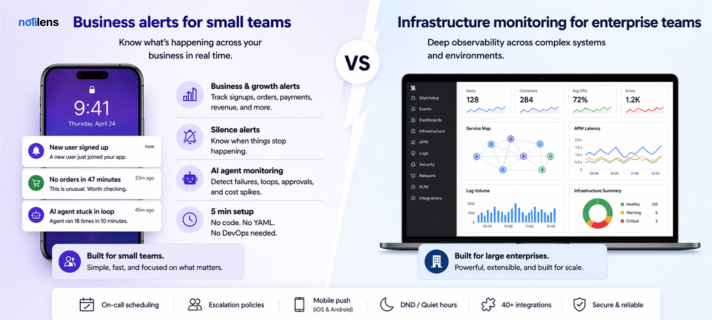
NotiLens vs Datadog: Business Monitoring Without the Enterprise Price Tag
Datadog is a powerful infrastructure observability platform — but it costs $100+/month before you've monitored a single Stripe payment. Here's how NotiLens compares for founders and small teams.
Datadog is one of the most powerful monitoring platforms on the planet. It's also one of the most expensive, most complex, and most over-engineered tools a small team can accidentally sign up for.
If you've looked at Datadog's pricing page and felt a mild panic — you're not alone. This post breaks down exactly how NotiLens and Datadog compare, who each is built for, and why thousands of founders are choosing simpler tooling that covers the whole business, not just the infrastructure.
| NotiLens | Datadog | |
|---|---|---|
| Built for | Founders, small teams, builders | Enterprise engineering & DevOps |
| Setup time | 5 minutes | Hours to days |
| Starting price | $19/mo flat | ~$15/host/mo + per-feature add-ons |
| Typical bill (small team) | $19–$89/mo | $200–$800+/mo |
| Silence alerts | ✅ Yes — core feature | ❌ No |
| Business alerts (Stripe, Shopify) | ✅ Yes | ❌ No |
| AI agent monitoring | ✅ Yes (MCP-native) | ⚠️ Partial (LLM Observability add-on) |
| Infrastructure monitoring | ✅ Yes | ✅ Yes (best-in-class) |
| On-call scheduling | ✅ Yes | ⚠️ Via On-Call add-on ($?) |
| No-code setup | ✅ Yes | ❌ Requires engineering |
| Predictable pricing | ✅ Flat rate | ❌ Usage-based, unpredictable |
| Free trial | ✅ 7 days, no card | ✅ 14 days |
| Mobile push | ✅ iOS + Android | ✅ iOS + Android |
What Is Datadog?
Datadog is an enterprise observability platform built around infrastructure monitoring — servers, containers, Kubernetes clusters, cloud services, application performance, logs, and traces. It's genuinely world-class at what it does.
It's also built for engineering organisations with a dedicated DevOps or SRE team, a budget for enterprise tooling, and the time to configure, instrument, and maintain a complex observability stack.
Datadog's pricing reflects this. It's modular — you pay per host, per log ingestion volume, per APM trace, per custom metric, per user for on-call. Bills compound fast and unpredictably. A modest setup for a 3-person team can easily reach $300–600/month before you've turned on half the features.
What Is NotiLens?
NotiLens is a business monitoring and alerting platform built for founders, developers, and small teams. It watches your entire stack — Stripe, Shopify, GitHub, servers, AI agents, cron jobs, APIs — and alerts you the instant something breaks or goes silent.
The philosophy is different from Datadog. NotiLens isn't trying to give you infinite dashboards and telemetry data. It's trying to answer one question: is my business healthy right now? And if not — tell you immediately, before your users do.
Pricing: The Most Important Difference
Datadog's pricing is notoriously complex. Here's what a small team realistically pays:
Datadog (small team, basic setup):
- Infrastructure monitoring: $15/host/mo × 3 servers = $45/mo
- Log management: ~$0.10/GB ingested — grows fast
- APM: $31/host/mo × 3 = $93/mo
- Custom metrics: $0.05/metric/month — easy to rack up 1,000+
- On-call scheduling: separate add-on, separate pricing
- Realistic monthly bill: $200–600+/mo — and it fluctuates
NotiLens:
- Pro: $19/mo — solo founder, unlimited topics, 5,000 events/mo
- Team: $89/mo — up to 10 people, 50,000 events/mo, on-call + escalation
- Flat rate. No surprises. No per-host, per-log, per-metric billing.
For a team choosing between the two purely on cost, NotiLens is 5–10x cheaper for a comparable small-team setup. The money you save covers your Stripe fees for a month.
Setup Complexity
Datadog requires:
- Installing the Datadog Agent on every server
- Configuring integrations per service (each has its own setup docs)
- Writing monitors and alert conditions in their query language
- Setting up dashboards to surface what matters
- Typical time to meaningful alerting: half a day to several days
NotiLens requires:
- One-click connect to Stripe, Shopify, GitHub, or your server
- Or paste a webhook URL into any tool
- Define your alert rules in plain language (thresholds, silence windows, patterns)
- Typical time to meaningful alerting: under 5 minutes
No agent install. No YAML. No query language to learn. No ops engineer required.
Infrastructure Monitoring: Where Datadog Wins
Let's be direct: if deep infrastructure observability is your primary need, Datadog is better.
Datadog has:
- Full distributed tracing across microservices
- Log aggregation, parsing, and full-text search
- APM with flame graphs and service maps
- Kubernetes and container-level visibility
- 600+ integrations with cloud and infrastructure tools
- Anomaly detection on millions of custom metrics
If you're running a complex distributed system and need to debug production incidents at the trace level, Datadog is the right tool. NotiLens doesn't try to replace it for that use case.
Business Monitoring: Where NotiLens Wins
But here's what Datadog can't do — and what most small teams actually need:
Datadog has zero awareness of your business layer. It can't tell you:
- Your Stripe revenue dropped 40% in the last hour
- No new Shopify orders in 47 minutes (during peak hours)
- Your SaaS signup flow silently broke at 2am
- A cron job that should run every hour hasn't run in 26 hours
- Your AI agent is stuck in a loop
These aren't infrastructure problems. They're business problems. And they're often more expensive than a server going down.
NotiLens watches your entire business — payments, orders, signups, deployments, agents, jobs — and alerts you on what actually costs you money when it breaks.
The Silence Alert Difference
Both tools can fire alerts when something goes wrong. Only NotiLens fires when something that should be happening stops happening.
This is called a silence alert — and it's NotiLens's most defensible feature.
Examples:
| Scenario | Datadog | NotiLens |
|---|---|---|
| Server CPU > 90% | ✅ Alerts | ✅ Alerts |
| API returning 500 errors | ✅ Alerts | ✅ Alerts |
| No new signups in 4 hours | ❌ Can't detect | ✅ Alerts |
| No Stripe payment in 2 hours | ❌ Can't detect | ✅ Alerts |
| Cron job missed its window | ❌ Can't detect | ✅ Alerts |
| AI agent hasn't completed a task | ❌ Can't detect | ✅ Alerts |
Silence alerts catch the failures your uptime monitor misses — and often the ones that cost you the most revenue.
AI Agent Monitoring
This is a category that's moving fast in 2026, and both tools are approaching it differently.
Datadog launched LLM Observability as an add-on — it traces LLM API calls, measures latency, logs prompts and completions, and tracks token usage. It's strong for deep telemetry on AI-powered applications but requires SDK instrumentation and adds to your bill.
NotiLens approaches AI agent monitoring from the alerting side:
- Agent task failures and timeouts
- Loop detection — agent ran too many times in a short window
- Human-in-the-loop alerts — instant push when your agent needs approval
- Cost spike alerts — notified before your OpenAI bill explodes
- MCP server support — agents alert NotiLens natively, zero code required
- Silence detection — AI agent hasn't completed a task in X hours
If you need deep traces of every LLM call, Datadog wins. If you need to know right now that your agent is stuck or your costs are spiking — NotiLens is faster and simpler.
On-Call Scheduling
Datadog On-Call launched recently as a standalone add-on. It supports escalation policies, schedules, and mobile push. It's priced separately and designed to complement their incident management workflow — best for teams already deep in the Datadog ecosystem.
NotiLens On-Call is included in the Team plan ($89/mo) with:
- Weekly, daily, or custom rotation lengths
- Per-day active hours with timezone awareness per user
- Holiday overrides and ad-hoc swaps
- Unlimited escalation steps with configurable delays
- Do Not Disturb that still routes critical alerts through escalation
- Configurable in about 10 minutes
For small teams, NotiLens on-call covers everything you need without paying for another Datadog add-on.
Integrations
Datadog: 600+ integrations — cloud infrastructure, APM, logging, security, and developer tools. Exceptional breadth for infrastructure telemetry.
NotiLens: 40+ integrations — covering the full business stack:
- Revenue: Stripe, Shopify, WooCommerce
- Developer: GitHub, GitLab, Sentry, Datadog, Vercel, Linear
- Automation: Zapier, Make, n8n
- AI agents: OpenAI, Claude, LangChain (via MCP server)
- Infrastructure: AWS, Grafana, Datadog (as a source)
- Customer success: Intercom
- Custom: Webhooks, REST API, SDK (Python, Node.js, Go, Rust, Ruby, PHP, Java)
Worth noting: you can actually use Datadog as a source for NotiLens — route Datadog's infrastructure alerts into NotiLens for business-aware routing, on-call scheduling, and silence detection. Some teams run both.
Can You Use Both?
Yes — and some teams do.
A common setup: Datadog for infrastructure telemetry + NotiLens for business alerting and on-call routing.
Datadog handles the deep observability layer — traces, logs, APM. NotiLens handles the business layer — payments, orders, AI agents, cron jobs — and serves as the alerting and on-call hub for the whole team. The two tools are complementary, not mutually exclusive.
Who Should Use Datadog?
Datadog is the right choice if you:
- Run a 15+ person engineering team with dedicated SRE/DevOps
- Need distributed tracing across microservices
- Require enterprise log management and SIEM capabilities
- Have a predictable infra budget for $300–600+/mo
- Need deep Kubernetes or container-level visibility
Who Should Use NotiLens?
NotiLens is the right choice if you:
- Are a solo founder or small team (1–10 people)
- Need to monitor your business — not just your servers
- Want alerts when things go quiet, not just when they break
- Use Stripe, Shopify, GitHub, or AI agents in your stack
- Want a predictable flat bill you can explain to a co-founder
- Need to be set up in 5 minutes, not 5 days
Not sure where to start? See The Founder's Monitoring Stack for a week-by-week setup guide.
Final Verdict
Datadog is the gold standard for enterprise infrastructure observability. If that's your context and budget, it earns its reputation.
But if you're a founder or small team trying to know whether your business is healthy right now — Datadog is like buying a Formula 1 telemetry system to monitor a food truck.
NotiLens is built for the way you actually work. One caught payment failure or silent signup breakdown pays for a full year of NotiLens.
Try NotiLens free for 7 days — no credit card required.
Frequently Asked Questions
Is NotiLens a Datadog replacement? For infrastructure telemetry (traces, logs, APM), no — Datadog is best-in-class at that. For business monitoring, silence alerts, on-call scheduling, and alerting across Stripe, Shopify, and AI agents, NotiLens covers more ground for far less money. Many teams run both.
Can NotiLens receive alerts from Datadog? Yes. You can route Datadog alerts into NotiLens via webhook, then use NotiLens's on-call scheduling, escalation policies, and DND to handle routing and acknowledgement. This is a popular setup for teams that want Datadog's observability depth with NotiLens's simpler alerting layer on top.
Why is Datadog so expensive for small teams? Datadog's pricing is per-host, per-log-volume, per-APM-host, and per-custom-metric — all billed separately and usage-based. A minimal setup for 3 servers with APM and log management easily reaches $200–400/mo. Add on-call, security monitoring, or database monitoring and it compounds quickly.
Does NotiLens monitor servers? Yes. NotiLens monitors server uptime, CPU thresholds, memory usage, disk space, API error rates, and SSL expiry. It's not as deep as Datadog's full APM stack, but it covers the alerts that matter most to small teams without the complexity or cost.
What makes silence alerts different from normal monitors? A normal monitor fires when a metric crosses a threshold — CPU > 90%, error rate > 5%. A silence alert fires when an expected event stops occurring — no new order in 47 minutes, no cron job in 26 hours, no AI agent completion in 2 hours. Most monitoring tools, including Datadog, don't support this natively.