How to Detect Infinite Loops in AI Agents Before They Drain Your Token Budget
AI agent infinite loops don't throw exceptions. They look like normal activity — tool calls firing, tokens consuming, the process alive — until the budget is gone and the output is empty. Here's how to detect and stop them in real time.
Your AI agent is running. Tool calls are firing. Tokens are being consumed. The process looks healthy from the outside.
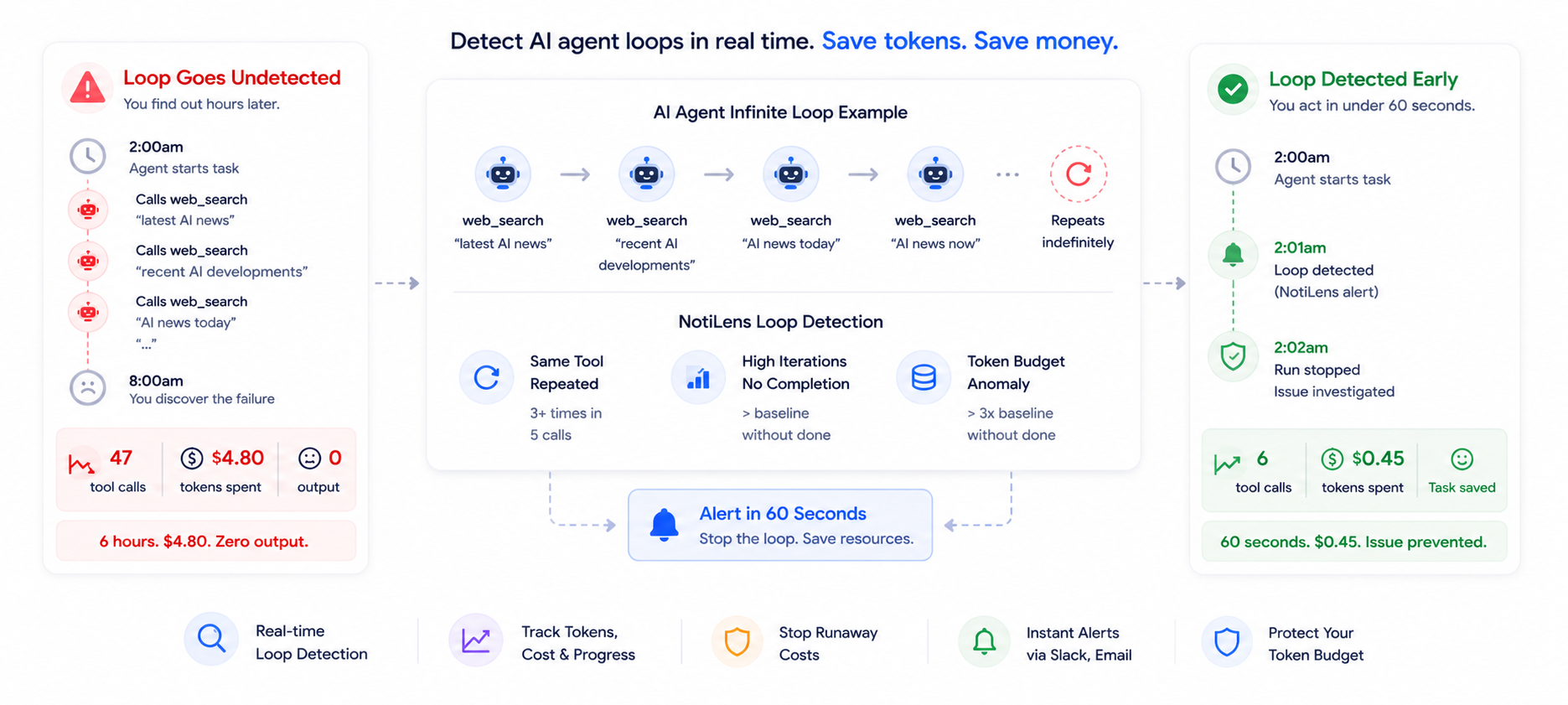
What's actually happening: the agent called web_search with the query "latest AI news". Got results. Called web_search again with "recent AI developments". Got similar results. Called it again with "AI news today". And again. And again.
47 tool calls. Zero useful output. $4.80 in tokens. The task was never going to complete.
This is the AI agent infinite loop — and it's one of the most expensive silent failures in LLM-powered production systems.
Why Loops Are Invisible to Conventional Monitoring
The reason loops are so damaging is that they produce no error signal.
Your uptime monitor sees: process running.
Your error monitor sees: no exceptions thrown.
Your log monitor sees: tool tool calls completing successfully.
Your OpenAI dashboard sees: token consumption. (but no per-task breakdown).
Nothing in your conventional stack identifies that the agent is calling the same tool repeatedly with no progress toward the task. The process looks identical to a healthy agent doing legitimate multi-step research.
The signal isn't an error. It's a pattern — the same tool, called repeatedly, with no convergence toward a completion event.
Catching that pattern requires monitoring that understands what the agent is supposed to be doing, not just whether it's technically running.
What Causes AI Agent Loops
Understanding the cause helps you instrument the right detection:
Ambiguous task objective The agent's goal is underspecified. It searches, finds something relevant, but can't determine if it's "enough" to complete the task. It keeps searching, looking for a confidence threshold it can never reach.
Tool output that looks like progress but isn't The agent calls a tool, gets a result, interprets the result as indicating "more work needed," calls another tool, gets another result — in a cycle. Each result genuinely looks like partial progress. The agent never recognises the loop.
Malformed tool responses A tool returns an unexpected format. The agent tries to parse it, fails, retries the tool call with slightly different parameters, gets the same malformed response, retries again. Each retry looks like a new attempt.
Conflicting instructions A system prompt says "be thorough." A user instruction says "use multiple sources." The agent interprets this as requiring ever-more tool calls and never converges on "thorough enough."
Context window pressure As the context fills with tool call results, the agent loses track of what it's already tried. It starts repeating earlier tool calls, not because it's stuck, but because it can't remember it already called them.
max_iterations as the only safeguard
Most teams set max_iterations=10 or max_iterations=15 and consider it handled. It isn't. max_iterations stops the loop — but it doesn't alert you, doesn't tell you how many times the agent looped before stopping, and doesn't catch the loop until it's already consumed the budget. It's a circuit breaker, not a monitor.
The Three Loop Signatures to Watch
Not all loops look the same. Here are the three patterns NotiLens detects:
Signature 1 — Same tool, repeated calls
The most common loop. The agent calls the same tool 3+ times in a short window without a completion event in between.
Detection logic: track the last N tool calls. If the same tool appears in 3 of the last 5 calls — alert.
web_search → web_search → web_search ← loop detected
Signature 2 — High iteration count, no completion
The agent has made more tool calls than your baseline for this task type, but hasn't fired a completion event.
Detection logic: track tool_calls metric per run. Alert if tool_calls > baseline_p95 without a run.complete().
Tool calls: 18
Normal completion at: 4–6 tool calls
Status: no completion event
→ Loop detected
Signature 3 — Token budget anomaly
The agent has consumed significantly more tokens than the baseline for this task type, without completing.
Detection logic: track cumulative token consumption per run. Alert if tokens exceed baseline × threshold_multiplier (e.g. 3x) without a completion event.
Tokens consumed: 42,000
Normal consumption: 3,000–6,000
Status: no completion event
→ Budget anomaly detected
Detecting Loops With NotiLens
Install
pip install notilens        # Python
npm install @notilens/notilens  # Node.js
The Core Pattern
Call run.loop() on every iteration of your agent loop — not as a detection signal, but as a progress signal that tells NotiLens the agent is in an iteration step.
NotiLens ML watches how many times run.loop() fires per run, learns what's normal for your agent, and alerts when the pattern is anomalous — too many iterations, firing too fast, with no run.complete() arriving. You write zero detection logic.
Python:
import notilens

nl  = notilens.init(name="ai-agent")  # token/secret from env or ~/.notilens_config.json
run = nl.task("research")

run.start()

for iteration in range(max_iterations):
    tool_name, tool_input = agent.decide_next_action()

    run.loop(f"[{iteration + 1}] Tool: {tool_name}")  # ✦ called every iteration
    run.metric("tool_calls", 1)                        # accumulates

    result = execute_tool(tool_name, tool_input)

    if agent.is_done(result):
        break

run.metric("tokens", total_tokens_used)
run.complete("Task completed")
Node.js:
import { NotiLens } from '@notilens/notilens';

const nl  = NotiLens.init('ai-agent'); // token/secret from env or ~/.notilens_config.json
const run = nl.task('research');

run.start();

for (let i = 0; i < maxIterations; i++) {
  const { toolName, toolInput } = agent.decideNextAction();

  run.loop(`[${i + 1}] Tool: ${toolName}`);  // ✦ called every iteration
  run.metric('tool_calls', 1);               // accumulates

  const result = await executeTool(toolName, toolInput);

  if (agent.isDone(result)) break;
}

run.metric('tokens', totalTokensUsed);
run.complete('Task completed');
NotiLens ML does the rest:
- Learns how many
run.loop()calls your agent normally makes per successful run - Learns how fast they normally fire
- Alerts when a run has significantly more iterations than your baseline — with no
run.complete()arriving - No threshold to configure. No detection logic to write.
Token and Cost Tracking
Track token consumption per run — NotiLens ML uses this alongside iteration count to detect cost anomalies:
# After each LLM call, pass the token count
run.metric("tokens", tokens_used_this_call)           # accumulates across calls
run.metric("cost_usd", round(tokens_used_this_call * 0.0000002, 6))
If a run consumes 5x more tokens than your baseline without completing, NotiLens flags it — even without a manually configured budget.
Agent Stall Detection
If your agent pauses waiting on a slow tool or external API, use run.wait():
run.wait("Awaiting API response")
result = call_slow_external_api()   # if this stalls, Smart Silence Detection alerts
run.progress("API response received")
run.wait() is non-terminal — the run continues. Smart Silence Detection learns how long your agent normally spends between events and fires if the gap becomes anomalous.
What You See in NotiLens When a Loop Is Detected
Every run.loop() call creates an event in NotiLens. As iterations accumulate, NotiLens ML recognises the pattern is anomalous — too many iterations for this agent's baseline, with no run.complete() arriving — and fires an alert.
✅ task.started           Research agent — task started
🔄 task.loop              [1] Tool: web_search
🔄 task.loop              [2] Tool: web_search
🔄 task.loop              [3] Tool: web_search
🔄 task.loop              [4] Tool: web_search
🔄 task.loop              [5] Tool: web_search
🔄 task.loop              [6] Tool: web_search
   ⚠️  Anomaly detected   Iteration count 6 — exceeds learned baseline (avg: 3.2)
                          No task.complete received
                          tool_calls: 6 | tokens: 8,420 | cost_usd: $0.0017
   → Push notification fired
   → On-call engineer paged
   → Escalation policy started (10 min to ACK)
The user wrote one line per iteration: run.loop(...). NotiLens detected the pattern automatically — no threshold configured, no detection logic written.
What to Do When a Loop Alert Fires
When NotiLens fires a loop alert, the on-call engineer has three immediate options:
1. Kill the run
If the loop is clearly unproductive, terminate the agent process. The run.fail() will fire automatically when the process is killed, closing the NotiLens run.
2. Investigate and adjust Pull the run's tool call history from NotiLens. Identify which tool is looping and why. Common fixes: tighten the task prompt, add explicit stopping criteria, fix a malformed tool response, add deduplication to the tool call sequence.
3. Let max_iterations handle it
If the loop isn't costing much and the fix can wait, let max_iterations stop it. But the NotiLens alert means you know it happened — you can investigate after the fact rather than discovering it on your OpenAI invoice.
Beyond Loops — The Full AI Agent Monitoring Checklist
Loop detection is one layer. A production-ready agent needs all of these:
-
run.loop()called on every agent iteration — NotiLens ML detects the pattern -
run.start()fires when task begins -
run.complete()fires on successful completion -
run.fail()fires on any unhandled exception -
run.error()fires on non-fatal tool errors (task continues) -
run.timeout()fires if agent exceeds your SLA window -
run.wait()fires when agent pauses on a slow external call -
run.metric("tool_calls", 1)accumulates per iteration -
run.metric("tokens", ...)tracks token usage — ML detects cost anomalies -
run.metric("cost_usd", ...)tracks cost per run - Smart Silence Detection active — alerts if agent stalls with no events
- On-call routing configured for loop alerts
- Tested — ran a looping agent and confirmed NotiLens detected and alerted For the full instrumentation guide see How to Monitor LangChain Agents in Production. For the broader context of where agent monitoring fits in your stack, see The Founder's Monitoring Stack.
Summary
AI agent infinite loops are invisible to conventional monitoring — no exceptions, no errors, just token consumption and empty output. By the time max_iterations fires, the budget is already spent.
Real-time loop detection requires monitoring the pattern of tool calls, not just whether the agent is running. Three signatures catch the vast majority of production loops: repeated tool calls in a short window, iteration count above baseline without completion, and token consumption above budget without completion.
The NotiLens loop detection handler catches all three — and fires an alert at call 6, not call 47.
Try NotiLens free for 7 days — no credit card required.
Frequently Asked Questions
Does loop detection replace max_iterations or similar safeguards?
No — use both. Your framework's max_iterations (or equivalent) is your circuit breaker: it guarantees the agent stops eventually. NotiLens loop detection is your early warning system: it tells you the agent is looping while it's happening, before the circuit breaker fires, so you can act sooner and investigate while the run is still in progress.
Do I need to configure any thresholds for loop detection? No. NotiLens ML learns your agent's normal iteration count from observed runs. As your agent processes more tasks, the baseline stabilises. You don't configure a threshold — the model decides what's anomalous based on your actual patterns. If your agent legitimately runs 15+ iterations on complex tasks, the model learns that and won't alert on it.
Will loop detection cause false positives? Unlikely after the first few days of data. The ML model learns your agent's normal iteration range including variance. A research agent that sometimes runs 12 iterations won't alert just because it ran 10 today. It alerts when a run is statistically anomalous — significantly above your learned baseline with no completion event arriving.
Does this work with any agent framework?
Yes — the pattern is fully framework-agnostic. Call run.progress() and run.metric("tool_calls", 1) on each tool invocation, and run.loop() when your detection condition is met. Works with LangChain, CrewAI, AutoGen, LlamaIndex, Pydantic AI, or any custom agent loop. The NotiLens SDK has no dependency on any specific framework.
What if my agent legitimately needs 20+ tool calls?
Set baseline_tool_calls to a value above your legitimate maximum — if you've observed your agent completing tasks with up to 18 tool calls, set the threshold at 25. The goal is catching runs that are anomalously high, not runs that are legitimately complex. Use run.metric("tool_calls", 1) to accumulate a data sample first, then set the threshold at p95 + 50%.