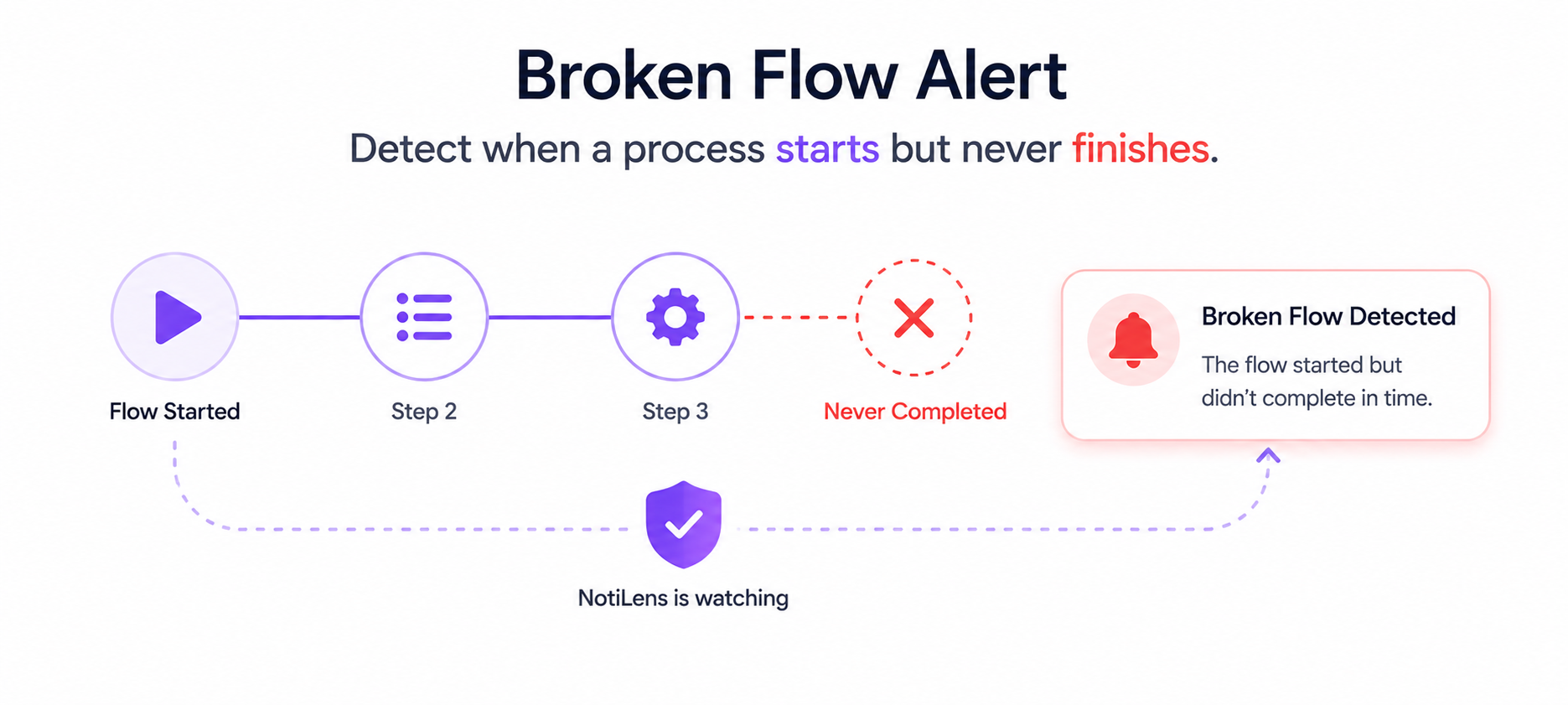
What Is a Broken Flow Alert? The Monitoring Concept Built for Multi-Step Processes
A broken flow alert fires when a multi-step process starts but never finishes. Payment initiated, never completed. Signup started, never confirmed. Job started, never done. Here's how it works and why it matters.
Your payment flow has two steps: payment.initiated and payment.completed.
Most of the time, both happen. A customer clicks pay, the payment goes through, done.
But sometimes — more often than you'd think — the first event fires and the second never comes. The payment was initiated. It never completed. And nothing in your monitoring stack told you.
This is what a broken flow alert is designed to catch.
The Gap Between "Started" and "Done"
Modern software is full of multi-step processes. Each step fires an event. Each event is logged somewhere. But the gap between steps — the window where something can go wrong in the middle — is almost universally unmonitored.
Consider how many of your critical flows look like this:
payment.initiated→payment.completeduser.registered→email.verifiedorder.placed→order.fulfilledjob.started→job.completedagent.task_assigned→agent.task_completedinvoice.generated→invoice.paidsignup.started→account.activatedEach of these is a flow with a beginning and an end. When the beginning happens without the end, something broke in the middle. But unless you're explicitly watching for the pair — not just the individual events — you'll never know.
Uptime monitors don't catch this. Error monitors don't catch this. Log monitors don't catch this unless the gap itself produces an error, which it usually doesn't.
Broken flow alerts do.
What Is a Broken Flow Alert?
A broken flow alert fires when a defined sequence of events starts but doesn't complete within an expected time window.
You define:
- The trigger event — the event that starts the flow (e.g.
payment.initiated) - The completion event — the event that confirms the flow finished (e.g.
payment.completed) - A unique flow ID — passed in the event metadata so NotiLens can link the trigger and completion to the same specific transaction NotiLens watches for the trigger. When it arrives, it starts tracking that flow instance by its unique ID. The ML model learns how long your flows normally take to complete — no manual window to configure. If the completion event doesn't arrive within the learned baseline, you get alerted.
If the completion event arrives in time, the flow resolves silently. No alert, no noise.
How It's Different From a Silence Alert
Both broken flow alerts and silence alerts deal with missing events — but they're solving different problems.
| Silence Alert | Broken Flow Alert | |
|---|---|---|
| What it watches | A recurring event that should keep arriving | A specific sequence: A must be followed by B |
| Trigger | No event arrives within the baseline window | Event A arrives, but Event B never follows |
| Use case | "No new orders in 2 hours" | "payment.initiated never reached payment.completed" |
| Scope | Population-level — is this flow healthy overall? | Instance-level — did this specific transaction complete? |
| Example | No Stripe webhooks in 4 hours | This specific payment was initiated 15 minutes ago and never completed |
Silence alerts are great for catching when a flow has gone entirely quiet. Broken flow alerts catch when individual transactions get stuck midway — even if the overall flow is still processing other events normally.
You need both.
Real-World Examples
Payment processing
Flow: payment.initiated → payment.completed
Window: 10 minutes
A customer starts a checkout. Your system initiates a payment with Stripe. Stripe processes it. But something goes wrong between Stripe's response and your system writing the completion event — a database timeout, a webhook delivery failure, a network blip.
The payment may or may not have gone through on Stripe's side. Your system doesn't know. The customer is waiting. Without a broken flow alert, you find out when they email support.
With a broken flow alert, you know within 10 minutes that this specific transaction needs investigation.
User onboarding
Flow: user.registered → email.verified
Window: 48 hours
A user signs up. Your system creates their account and sends a verification email. But your email provider silently dropped the email. The user never verified. They churned before they ever used the product.
Without monitoring the flow, you see a signup in your database and assume it converted. With a broken flow alert, you know within 48 hours that this user never completed verification — and you can trigger a follow-up.
Order fulfilment
Flow: order.placed → order.fulfilled
Window: 24 hours
A customer places an order. Your fulfilment system receives it. But a bug in your warehouse integration means the order never gets picked. The customer expects delivery. Your system thinks everything is fine.
A broken flow alert catches every order that placed but never fulfilled — before the customer raises a complaint.
Background jobs
Flow: job.started → job.completed
Window: 30 minutes
Your data sync job starts as scheduled. It begins processing. Halfway through, a dependency fails — an API rate limit, a database connection drop, a memory error. The job crashes without completing. The start event fired. The completion event never came.
Broken flow detection catches this immediately — not when someone notices stale data hours later.
AI agent tasks
Flow: agent.task_assigned → agent.task_completed
Window: 2 hours
An AI agent is assigned a task. It starts processing. It hits a tool error, enters a loop, or stalls waiting for an external API. The task was assigned but never completed. Without broken flow detection, the agent burns compute silently and the task result never arrives.
Why Most Monitoring Tools Don't Have This
Broken flow detection requires your monitoring system to understand relationships between events — not just the presence or absence of individual events.
Most monitoring tools are built around metrics and thresholds. They ask: "is this value above or below a line?" They have no concept of "did event A lead to event B for this specific transaction?"
Building broken flow detection requires:
- Event correlation — linking the trigger event and the completion event to the same flow instance
- Per-instance timers — tracking the window independently for each in-flight transaction
- Stateful monitoring — maintaining state across events, not just snapshotting at a point in time This is fundamentally different from threshold-based monitoring. It's closer to workflow orchestration than traditional observability — and it's why almost no alerting tool supports it.
NotiLens was built from the start around event flows, not just metrics. Broken flow detection is a first-class feature, not a bolted-on add-on.
How to Set Up a Broken Flow Alert in NotiLens
Step 1 — Install the SDK and initialise a source
pip install notilens            # Python
npm install @notilens/notilens  # Node.js
Each NotiLens source maps to a topic in your dashboard. Create one per flow type — e.g. payments, db-backup, order-fulfilment.
# Python
import notilens
nl = notilens.init(name="payments", token="YOUR_TOKEN", secret="YOUR_SECRET")
# After first run, credentials are saved to ~/.notilens_config.json
// Node.js
import { NotiLens } from '@notilens/notilens';
const nl = NotiLens.init('payments', { token: 'YOUR_TOKEN', secret: 'YOUR_SECRET' });
Step 2 — Instrument your flow with the SDK
Use the NotiLens SDK's task lifecycle methods. The run object NotiLens creates is your flow instance — run.start() is the trigger, run.complete() is the completion. NotiLens correlates them automatically via the run context. No manual flow ID needed.
Install:
pip install notilens            # Python
npm install @notilens/notilens  # Node.js
Python:
import notilens

nl = notilens.init(name="payments")  # token/secret from env or ~/.notilens_config.json

def process_payment(payment_id, amount):
    run = nl.task("payment")

    run.start()                                      # ✦ flow started — NotiLens starts tracking
    run.track("payment.initiated", f"Payment {payment_id}", meta={"amount": amount})

    # Your payment logic
    result = stripe.PaymentIntent.create(amount=amount, currency="usd")

    run.metric("amount", amount)
    run.track("payment.completed", f"Payment {payment_id} done",
              meta={"stripe_intent_id": result.id})
    run.complete("Payment processed")               # ✦ flow completed — NotiLens resolves
Node.js:
import { NotiLens } from '@notilens/notilens';

const nl = NotiLens.init('payments'); // token/secret from env or ~/.notilens_config.json

async function processPayment(paymentId, amount) {
  const run = nl.task('payment');

  run.start();                                       // ✦ flow started — NotiLens starts tracking
  run.track('payment.initiated', `Payment ${paymentId}`, { meta: { amount } });

  // Your payment logic
  const intent = await stripe.paymentIntents.create({ amount, currency: 'usd' });

  run.metric('amount', amount);
  run.track('payment.completed', `Payment ${paymentId} done`,
    { meta: { stripe_intent_id: intent.id } });
  run.complete('Payment processed');                 // ✦ flow completed — NotiLens resolves
}
If run.start() fires but run.complete() never arrives — because the payment logic crashed, the webhook failed, or something broke in the middle — NotiLens detects the open flow and alerts you.
Step 3 — NotiLens handles the rest automatically
No manual configuration needed. Once your SDK code is deployed:
- NotiLens learns how long your flows normally take to complete via ML
- Each
nl.task("payment")call creates an isolated run instance — concurrent flows never conflict - If any run's
start()never reachescomplete()within the learned baseline, an alert fires - If 100 payments initiate and 99 complete — you get one alert, for the one that didn't
Step 4 — Set notification routing
- Push notification to your phone for immediate awareness
- On-call escalation if the flow is revenue-critical
- Team alert if multiple broken flows fire within a short window (potential systemic failure)
What to Monitor With Broken Flow Alerts First
| Flow | Trigger event | Completion event | Flow ID field |
|---|---|---|---|
| Payment processing | payment.initiated |
payment.completed |
payment_id |
| User onboarding | user.registered |
email.verified |
user_id |
| Order fulfilment | order.placed |
order.fulfilled |
order_id |
| Subscription activation | subscription.created |
access.provisioned |
subscription_id |
| Daily backup job | job.started |
job.completed |
job_run_id |
| AI agent task | agent.task_assigned |
agent.task_completed |
task_id |
| Invoice generation | invoice.generated |
invoice.sent |
invoice_id |
| Data sync | sync.started |
sync.completed |
sync_run_id |
Start with the flows where a stuck transaction directly costs you money or damages customer trust. Payment processing and subscription activation are almost always the right place to begin.
For how broken flow detection fits into a complete founder monitoring setup, see The Founder's Monitoring Stack.
Broken Flow Alerts + Silence Alerts: The Complete Picture
Used together, broken flow alerts and silence alerts give you complete coverage of your business processes:
Silence alert → "No payment events at all in the last 4 hours" — the entire flow has gone quiet
Broken flow alert → "This specific payment initiated 15 minutes ago and never completed" — one transaction is stuck
Silence alert → "No new user registrations in 6 hours during business hours" — your signup flow is broken
Broken flow alert → "This specific user registered 50 hours ago and never verified their email" — individual users falling through the cracks
Silence alert → "No job started in 26 hours" — the job isn't running at all
Broken flow alert → "This job started 45 minutes ago and hasn't completed" — the job is running but stuck
Together they cover both the macro health of your flows and the micro health of individual transactions.
Summary
Broken flow alerts fill the gap that every other monitoring tool leaves open: the space between "started" and "done."
Uptime monitors tell you your server is alive. Silence alerts tell you when expected activity stops. Broken flow alerts tell you when individual transactions get stuck in the middle — payment.initiated that never reached payment.completed, jobs that started but never finished, users who signed up but never activated.
It's a monitoring concept that barely exists in the industry today. NotiLens built it because founders and small teams lose real money to this class of failure every day — and they deserve a tool that catches it.
Try broken flow detection free for 7 days — no credit card required.
Frequently Asked Questions
How does NotiLens link the trigger event to the completion event?
Each call to nl.task("payment") creates an isolated run instance internally. NotiLens tracks run.start() and run.complete() within that same run object — so even if 100 payments are in flight simultaneously, each has its own run context and NotiLens never confuses them. No manual flow ID required.
What happens if a flow completes after the alert fires? NotiLens fires the broken flow alert when the ML model determines the flow has taken abnormally long. If the completion event arrives after the alert fires, NotiLens resolves the alert automatically and records the late completion. You get visibility into both the delay and the eventual resolution.
Can I control how sensitive the broken flow detection is?
NotiLens's ML model learns the normal completion time for each task independently — a payment task learns its own baseline, a backup task learns its own. As your flow's typical duration changes over time the model adapts automatically. No manual windows or thresholds to maintain.
Is broken flow detection the same as a saga pattern monitor? Conceptually similar. The saga pattern in distributed systems defines a sequence of steps with compensating transactions if something fails. Broken flow detection in NotiLens monitors the observability layer of that pattern — it tells you when a saga didn't complete, without requiring you to implement full saga orchestration. It's a lightweight monitoring wrapper around any multi-step process.
What if my flow has more than two steps? Currently NotiLens broken flow detection works on trigger → completion pairs. For flows with three or more steps, set up multiple pairs: step 1 → step 2, and step 2 → step 3. Each pair gets its own window and fires independently if a step is skipped.