NotiLens vs Pushover: When Push Notifications Aren't Enough
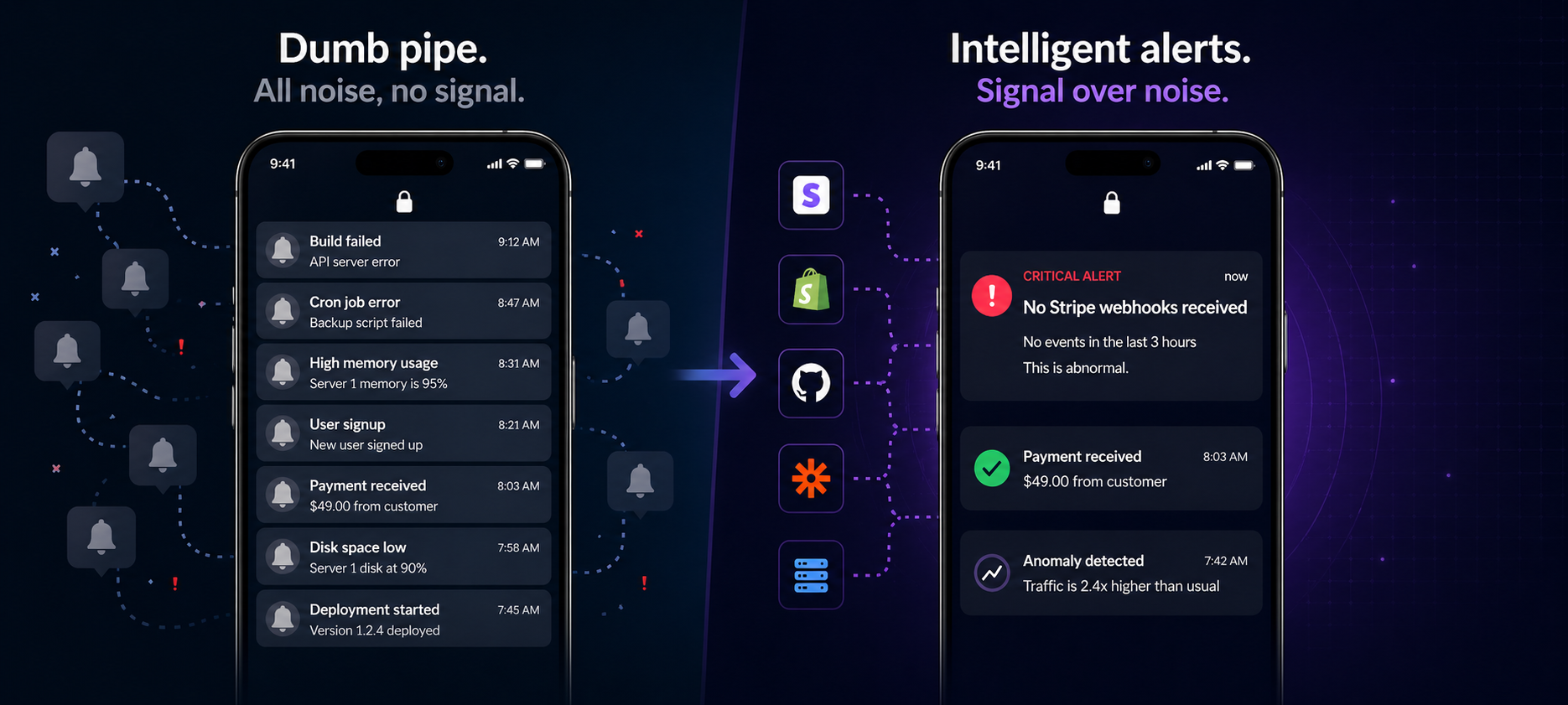
Pushover is a great dumb pipe for push notifications. But when your business needs intelligent alerting — silence detection, on-call scheduling, and ML-powered anomaly detection — it hits a wall fast.
If you're an indie hacker or solo developer, chances are you've used Pushover. It's cheap, it works, and it gets push notifications onto your phone in about 10 minutes.
For a long time, it was the default answer to "how do I get alerts from my app?"
But there's a point where Pushover stops being enough — and most developers hit it sooner than they expect. This post breaks down exactly where that line is, and what NotiLens does differently.
| NotiLens | Pushover | |
|---|---|---|
| Built for | Founders, small teams, intelligent alerting | Developers who need simple push delivery |
| Push notifications | ✅ iOS + Android | ✅ iOS + Android |
| Pricing | $19/mo (Pro), $89/mo (Team) | $5 one-time per platform |
| Smart Silence Detection | ✅ ML-powered, auto-learns baseline | ❌ No |
| Anomaly detection | ✅ Yes | ❌ No |
| On-call scheduling | ✅ Yes | ❌ No |
| Escalation policies | ✅ Yes | ❌ No |
| Do Not Disturb | ✅ Per-day, per-user, timezone-aware | ⚠️ Basic quiet hours only |
| Acknowledgement (ACK) | ✅ With repeat reminders | ✅ With retry |
| Team alerts | ✅ Up to 10 per topic | ⚠️ Via groups, limited |
| Business integrations | ✅ Stripe, Shopify, GitHub, 40+ | ❌ Send-only API |
| AI agent monitoring | ✅ Yes (MCP-native) | ❌ No |
| Alert intelligence | ✅ ML noise filtering | ❌ None — fires everything |
| Free trial | ✅ 7 days, no card | ✅ 30-day free trial |
What Is Pushover?
Pushover is a push notification delivery service. You send it a message via API, it delivers that message to your phone. That's the entire product.
It costs $5 once per platform (iOS or Android) and has no monthly fees. For solo developers who want a quick way to get alerts from a cron job or a server script, it's genuinely excellent at exactly what it does.
The keyword is delivery. Pushover is a dumb pipe — a reliable, cheap, simple pipe for getting text from your app to your phone. It has no opinion on what you send, when you send it, or whether the absence of a message should itself be an alert.
That simplicity is its strength. It's also its ceiling.
What Is NotiLens?
NotiLens is an intelligent business monitoring and alerting platform. It doesn't just deliver notifications — it watches your business, learns what normal looks like, and tells you when something needs attention.
The difference in philosophy is significant:
- Pushover: your app decides what to send → Pushover delivers it
- NotiLens: NotiLens watches your business → NotiLens decides when to alert you
NotiLens connects to Stripe, Shopify, GitHub, your servers, your AI agents, and your custom apps — and monitors them continuously. It uses ML to learn your baseline patterns and alerts you when things go wrong, go quiet, or go anomalous.
Where Pushover Hits Its Ceiling
1. It can't alert you when nothing happens
This is the biggest limitation — and the one most developers don't think about until they've been burned by it.
Pushover can only fire when your app sends it a message. If your app breaks and stops sending messages, Pushover is silent. If your Stripe webhooks stop arriving, Pushover doesn't know. If your cron job silently fails at 3am, Pushover has nothing to deliver.
NotiLens's Smart Silence Detection flips this around. It learns your normal activity pattern using ML — how often signups arrive, how frequently payments flow, when cron jobs complete — and alerts you when that pattern goes abnormally quiet. No manual threshold to configure. No code change required.
This is the class of failure Pushover structurally cannot catch. And it's often the most expensive one.
2. It fires every single alert — noise included
Pushover delivers whatever you send it, unconditionally. This seems like a feature. In practice it becomes a problem.
As your app grows, you send more notifications. Some are critical. Most aren't. Without any intelligence layer, every alert hits your phone with equal urgency. You start ignoring notifications. Then you miss the one that mattered.
NotiLens filters noise at the source — 97% of raw events never become notifications. ML-powered anomaly detection identifies what's genuinely abnormal versus routine variation. Smart signals mean you only get alerted when it actually matters.
3. There's no on-call or escalation
What happens when a critical alert fires at 3am and you don't acknowledge it?
With Pushover: nothing. The notification sits there.
With NotiLens: the escalation policy kicks in. If the first person doesn't acknowledge within N minutes, the next person in the escalation chain gets paged. Then the next. This continues until someone responds — or until every step in the policy has fired.
On-call scheduling, rotation management, timezone-aware active hours, holiday overrides — none of this exists in Pushover. For a solo developer, that's fine. The moment you have a second person on the team who should ever receive an alert, you've outgrown Pushover's model.
4. No business integrations
Pushover is a send-only API. You build the logic, you decide what to monitor, you write the code to detect the condition, you call the API.
NotiLens connects to your business stack natively:
- Stripe — payment failures, webhook gaps, refund spikes, subscription changes
- Shopify — order monitoring, silence alerts, fulfilment gaps
- GitHub — PR stalls, CI failures, deployment events
- Servers — uptime, CPU, memory, disk, SSL expiry
- AI agents — task failures, loop detection, cost spikes, human approval requests
- 40+ more via Zapier, Make, n8n, Sentry, Datadog, Vercel, Linear, Intercom
For most of these you don't write a line of code. One-click connect, define what matters, done.
5. No team features beyond basic groups
Pushover supports delivery groups — you can send a message to multiple users at once. That's the extent of team functionality.
NotiLens has a full team model:
- Up to 10 users per topic on Team plan
- Per-user Do Not Disturb with per-day timezone-aware windows
- On-call rotation with weekly/daily/custom intervals
- Escalation policies that survive missed acknowledgements
- Role-based access so team members only see what's relevant to them
The moment you have two engineers sharing alert responsibility, NotiLens's team model becomes meaningful.
Where Pushover Still Wins
Let's be fair. Pushover has real advantages in specific situations:
Cost — $5 once vs $19/mo. If you're pre-revenue and just want a ping when a script fails, Pushover's economics are hard to argue with.
Simplicity — one API call, one notification. Zero configuration. If your use case is genuinely that simple, the added capability of NotiLens is unnecessary overhead.
No monthly commitment — Pushover's one-time fee is paid and forgotten. NotiLens is a subscription. For a developer who sends 10 alerts a month from a hobby project, that monthly cost feels unjustifiable.
Legacy integrations — if you've built years of alerting logic that already calls the Pushover API, switching has a real migration cost. Pushover isn't going anywhere.
The Real Question: Are You Monitoring or Just Notifying?
This is the clearest way to decide which tool is right for you.
You need Pushover if: Your app knows when something is wrong and you just need a reliable way to get that message to your phone. Simple, manual, code-driven alerting with no intelligence required.
You need NotiLens if: You want your alerting tool to be smarter than your app — to detect silence, learn your baseline, filter noise, route alerts intelligently, and cover the business failures your code doesn't know to look for.
Most developers start with Pushover. Most eventually need NotiLens.
Migrating From Pushover to NotiLens
If you're already using Pushover, switching takes about 20 minutes:
- Sign up for NotiLens — 7-day free trial, no credit card
- Create topics that match your existing Pushover channels
- Replace your Pushover API calls with NotiLens pings — same concept, one line change
- Auto Smart Silence Detection on your critical topics — no Pushover equivalent, instant upgrade
- Connect native integrations — Stripe, Shopify, GitHub — and remove the code you wrote to monitor these manually
- Set up on-call if you have a second person who should ever receive alerts
Most of the manual monitoring logic you wrote for Pushover becomes unnecessary. NotiLens watches it natively.
For the recommended setup order once you're in, see The Founder's Monitoring Stack
Side-by-Side: A Real Indie Hacker Stack
Here's how a typical indie hacker stack looks with each tool:
With Pushover:
- Write code to detect payment failure → call Pushover API
- Write code to detect server down → call Pushover API
- Write code to detect no signups → impossible, Pushover can't detect absence
- Write code to detect anomalous traffic → too complex, skip it
- On-call for the weekend? Manual phone swap, hope for the best
With NotiLens:
- Connect Stripe → payment failure alerts automatic
- Connect server → uptime alerts automatic
- Auto Smart Silence Detection → signup silence alerts automatic, ML handles baseline
- Anomaly detection → enabled by default, no code required
- On-call for the weekend → set up rotation in 10 minutes, done
The development time you spend writing Pushover notification logic — detecting conditions, formatting messages, managing retry logic — largely disappears.
Summary
Pushover is a great tool for what it is: a simple, cheap, reliable push notification pipe. If your alerting needs are basic and entirely code-driven, it's hard to beat at $5.
But the moment you need your alerting to be intelligent — to detect silence, learn your baseline, filter noise, escalate missed alerts, or cover your business stack without writing all the detection logic yourself — Pushover hits a hard ceiling.
NotiLens is what comes after Pushover. Same push notifications on your phone. Everything else is smarter.
Try NotiLens free for 7 days — no credit card required.
Frequently Asked Questions
Is NotiLens worth it if I'm pre-revenue? If you're actively building something you depend on, yes. One caught payment failure, broken signup flow, or silent cron job pays for months of NotiLens. If it's a genuine hobby project with no stakes, Pushover's $5 is the right call.
Can I use NotiLens and Pushover together? Technically yes, but there's little reason to. NotiLens delivers push notifications natively to iOS and Android — you don't need Pushover as the delivery layer. Once you're on NotiLens, Pushover is redundant.
Does NotiLens have a one-time payment option like Pushover? Not currently. NotiLens is a subscription starting at $19/mo. The intelligence layer — ML-powered silence detection, anomaly detection, on-call routing — requires continuous processing that a one-time fee doesn't support.
How long does it take to switch from Pushover to NotiLens? About 20 minutes for most setups. Replace Pushover API calls with NotiLens pings (one-line change), connect your native integrations (Stripe, Shopify, GitHub). Most of the detection logic you wrote for Pushover becomes unnecessary.
What's the NotiLens equivalent of Pushover's priority levels? NotiLens has four priority levels — info, warning, error, and critical — matching Pushover's model. Critical alerts trigger acknowledgement requirements and escalation policies if unacknowledged within your configured window. Warning and info alerts deliver quietly without repeat reminders.