NotiLens vs PagerDuty: Which Alerting Tool Is Right for Small Teams?
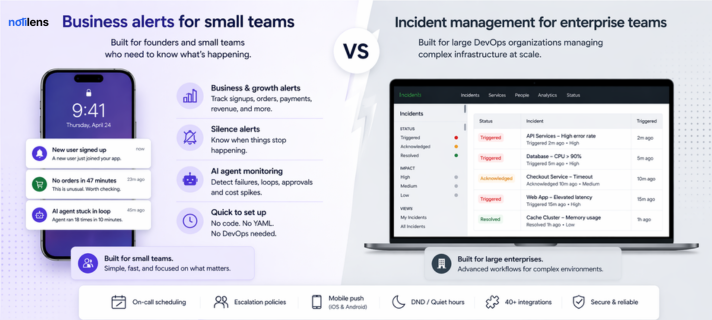
PagerDuty is built for enterprise DevOps. NotiLens is built for founders and small teams who need business-level alerts without a 6-week onboarding. Here's how they compare.
If you've searched for an on-call alerting tool recently, PagerDuty probably came up first. It's the market leader. It's also overkill for 90% of the teams that look at it.
This post breaks down exactly how NotiLens and PagerDuty compare — on pricing, setup, features, and who each tool is actually built for — so you can make the right call without sitting through a sales demo.
| NotiLens | PagerDuty | |
|---|---|---|
| Built for | Founders, small teams, builders | Enterprise DevOps orgs |
| Setup time | 5 minutes | Days to weeks |
| Starting price | $19/mo | $21/user/mo (minimum 5 users = $105/mo) |
| Silence alerts | ✅ Yes — core feature | ❌ No |
| Business alerts (Stripe, Shopify) | ✅ Yes | ❌ No |
| AI agent monitoring | ✅ Yes | ❌ No |
| On-call scheduling | ✅ Yes | ✅ Yes |
| Escalation policies | ✅ Yes | ✅ Yes |
| No-code setup | ✅ Yes | ❌ Requires engineering |
| Free trial | ✅ 7 days, no card | ✅ 14 days |
| Mobile push | ✅ iOS + Android | ✅ iOS + Android |
What Is PagerDuty?
PagerDuty is an incident management platform designed for large engineering teams. It centralises on-call scheduling, escalation policies, and incident response across complex infrastructure.
It's genuinely excellent — if you're a 50-person engineering organisation running microservices across multiple cloud providers.
If you're a 3-person startup trying to know when your Stripe payments stop flowing or your AI agent gets stuck in a loop, PagerDuty is the wrong tool.
What Is NotiLens?
NotiLens is a business monitoring and alerting platform built for founders, developers, and small teams. It watches your entire stack — Stripe, Shopify, GitHub, servers, AI agents, cron jobs — and alerts you the moment something breaks or goes silent.
The key word is silent. NotiLens is the only alerting tool that tells you when expected activity stops — no new signups in 4 hours, no orders in 47 minutes, no cron job in 26 hours. These are the failures that cost you the most, and they're invisible to conventional monitors including PagerDuty.
Pricing Comparison
This is where the gap is most obvious.
PagerDuty charges per user per month:
- Business plan: $21/user/mo
- A team of 3 = $63/mo minimum
- A team of 5 = $105/mo minimum
- Advanced features (AIOps, analytics) push costs to $100+/user/mo
- No predictable flat rate — bills grow with your team
NotiLens charges a flat rate per plan:
- Pro: $19/mo — solo founder, unlimited topics, 5,000 events/mo
- Team: $89/mo — up to 10 people, 50,000 events/mo, on-call + escalation
- Annual billing saves 2 months (equivalent)
For a team of 3, NotiLens Team ($89/mo) vs PagerDuty Business ($63–105/mo) is similar on price — but NotiLens covers your entire business stack, not just infrastructure incidents.
Setup & Onboarding
PagerDuty requires:
- Connecting monitoring tools (Datadog, CloudWatch, etc.) as sources
- Configuring services, escalation policies, and schedules
- Training team members on the incident workflow UI
- Typical onboarding: several days to 2 weeks for a full setup
NotiLens requires:
- One-click connect to Stripe, Shopify, GitHub, or your server
- Or paste a webhook URL into any tool
- Define what matters (thresholds, silence windows, rules)
- Typical onboarding: under 5 minutes
No engineering ticket. No YAML. No dedicated ops person required.
The Feature That PagerDuty Doesn't Have
Silence alerts are NotiLens's most defensible feature — and something PagerDuty has never built.
Here's the problem silence alerts solve:
Your server isn't down. Your API isn't erroring. Everything looks fine. But your signup flow silently broke at 2am — and nobody told you for 6 hours.
PagerDuty fires when something goes wrong. NotiLens also fires when something that should be happening stops happening. That's a fundamentally different model.
Examples of silence alerts NotiLens can send that PagerDuty cannot:
- 🔇 No new user signed up in the last 4 hours
- 🔇 No Shopify orders in the last 47 minutes
- 🔇 Cron job hasn't run in 26 hours
- 🔇 No new GitHub commits in 48 hours
- 🔇 AI agent hasn't sent a completion event in 2 hours
For founders and small teams, this is often the most valuable alert they receive.
On-Call Scheduling
Both tools support on-call scheduling, but at very different scales.
PagerDuty on-call:
- Sophisticated multi-team, multi-schedule coordination
- Integrates with 700+ monitoring tools as alert sources
- Complex to configure — built for ops teams managing it full-time
- Overkill for teams under ~20 engineers
NotiLens on-call:
- Weekly, daily, or custom rotation lengths
- Active hours per day per engineer (e.g. Mon–Fri 9am–6pm)
- Holiday overrides — swap coverage instantly
- Timezone-aware per user
- Escalation policies with unlimited steps and configurable delays
- Do Not Disturb that still respects critical alert escalation
- Configurable in about 10 minutes
For a small team rotating weekend on-call, NotiLens on-call covers everything you actually need.
Integrations
PagerDuty integrates with 700+ tools — primarily infrastructure and monitoring sources like Datadog, CloudWatch, New Relic, Prometheus, Grafana.
NotiLens integrates with 40+ tools — covering the full business stack:
- Revenue: Stripe, Shopify, WooCommerce
- Developer: GitHub, GitLab, Sentry, Datadog, Vercel, Linear
- Automation: Zapier, Make, n8n
- AI agents: OpenAI, Claude, LangChain (via MCP server)
- Infrastructure: AWS, Grafana, Datadog
- Customer success: Intercom
- Custom: Webhooks, REST API, SDK (Python, Node.js, Go, Rust, Ruby, PHP, Java)
The difference: PagerDuty is built to receive alerts from monitoring tools. NotiLens is built to monitor your business — revenue, growth, operations, and infrastructure — from a single place.
AI Agent Monitoring
This is a category PagerDuty hasn't touched.
If you're building with LLMs — whether that's a Claude agent, a GPT-powered workflow, or an n8n automation — NotiLens monitors them natively:
- Agent task failures and timeouts
- Loop detection (agent ran > N times in X minutes)
- Human approval requests — instant push notification
- Token budget and cost spike alerts
- MCP server support — agents send alerts natively, no SDK required
PagerDuty has no equivalent.
Who Should Use PagerDuty?
PagerDuty is the right choice if you:
- Run a 20+ person engineering team with dedicated DevOps/SRE
- Need to integrate with 100+ existing monitoring tools
- Require enterprise compliance features (SOC 2, HIPAA, SSO/SAML at scale)
- Have the budget and time for a proper enterprise onboarding
Who Should Use NotiLens?
NotiLens is the right choice if you:
- Are a solo founder or small team (1–10 people)
- Need to monitor your business, not just your servers
- Want to be alerted when things go quiet — not just when they break
- Use Stripe, Shopify, GitHub, or AI agents in your stack
- Want to be set up in 5 minutes, not 5 days
- Don't want a per-seat bill that grows unpredictably
Not sure where to start? See The Founder's Monitoring Stack for a week-by-week setup guide.
Final Verdict
PagerDuty is the industry standard for enterprise incident management. If that's your context, it deserves its reputation.
But if you're a founder running a SaaS, an e-commerce store, or an AI-powered product — PagerDuty is solving a problem you don't have, while missing the problems you do.
NotiLens was built specifically for your stack, your team size, and your budget. One alert from a failed Stripe payment or a broken signup flow pays for a full year of NotiLens.
Try NotiLens free for 7 days — no credit card required.
Frequently Asked Questions
Can NotiLens replace PagerDuty completely? For teams under 10 people, yes — in most cases. NotiLens covers on-call scheduling, escalation policies, DND, and alert routing. What it doesn't have is PagerDuty's 700+ integrations with enterprise monitoring tools. If you're already deep in a Datadog + PagerDuty setup, the switching cost matters. For everyone else, NotiLens covers more ground for less money.
Does NotiLens have a free plan? NotiLens offers a 7-day free trial with no credit card required. After the trial, paid plans start at $19/mo.
Is NotiLens good for DevOps teams? Yes. NotiLens supports server uptime monitoring, CPU/disk/memory threshold alerts, API error spikes, SSL expiry, CI/CD pipeline failures, and GitHub activity alerts. The difference from PagerDuty is that NotiLens also covers your business layer — payments, signups, orders — in the same tool.
What's the biggest difference between NotiLens and PagerDuty? Two things: silence alerts (NotiLens alerts when expected activity stops — PagerDuty doesn't), and business-layer monitoring (Stripe, Shopify, AI agents). PagerDuty is infrastructure-only. NotiLens covers your entire business.